
It’s starting to get into the good stuff with this chapter. I’m mostly going to be writing about the labs as that’s the interesting part for me and let’s me test everything out. Fair warning though, these will likely be a little long as I’m trying to practice documenting everything that seems relevant.
Lab 3-1 (Lab03-01.exe)
Question 1: What are the malware’s imports and strings?
The only DLL this file seems to import is KERNEL32.DLL along with the “ExitProcess” function. Not much we’re able to get from that.
Question 2 and 3: What are the malware’s host-based indicators? Are there any network-based signatures for this malware? If so, what are they?
When running Strings on the file it has several interesting entries for URLs, file names, and registry entries that are confirmed when it is run and the .data section in PEView gives a general idea of the flow. So let’s run it and see what happens.
1 – Network-Based – The program reaches out to “www.practicalmalwareanalysis.com” every minute, likely to receive commands for further instructions from the C&C (Command and Control) server. I setup a netcat listener on port 443 (https) to see if I can catch the HTTP request it sends out, which worked, but it seems to be random and changes each time.


2 – Host-based – Creates a new file called “wmx32to64.exe” in the C:\WINDOWS\system32 folder and adds it to the registry under HKLM\SOFTWARE\Microsoft\Windows\CurrentVersion\Run as the key “VideoDriver”. This seems to be for persistence so it will continue to send a beacon to the C&C server if the computer is restarted.
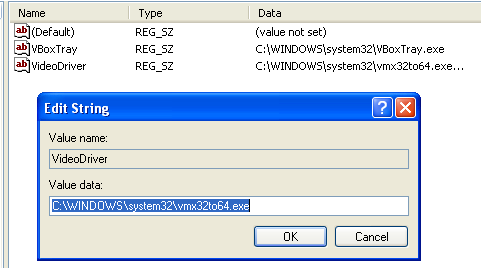

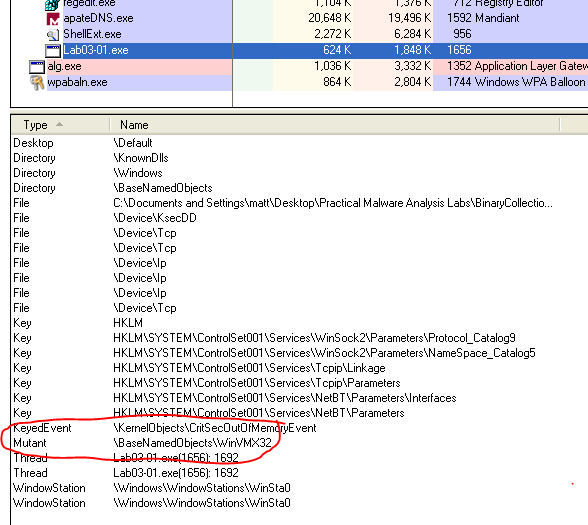
3 – Host-based – The program also creates a mutex called “WinVMX32” that is replicated by the “vmx32to64.exe” program mentioned above if the computer is restarted.
Lab 3-2 (Lab03-02.dll)
Question 1: How can you get this malware to install itself?
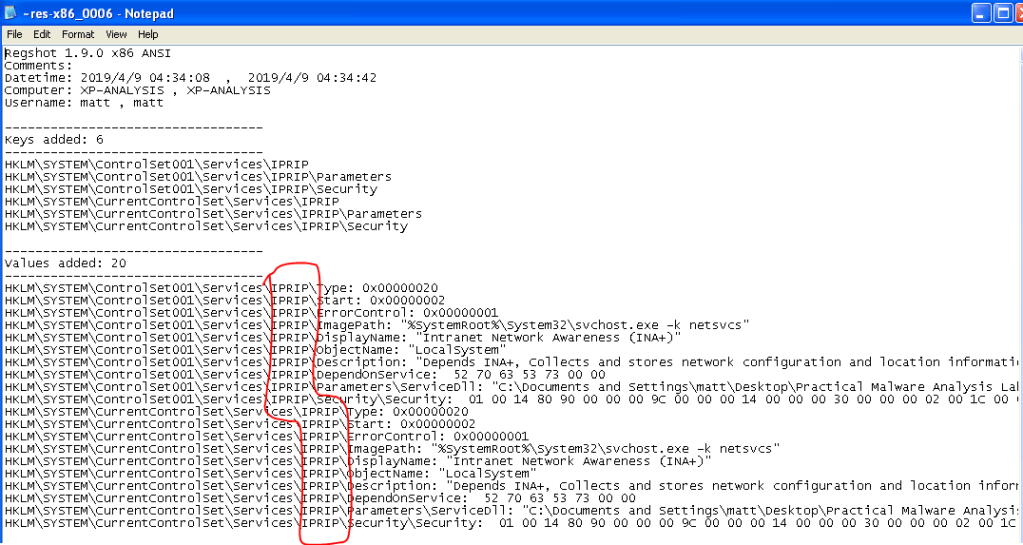
When looking at the file in PEView or Dependency Walker it shows several useful functions being exported, “Install”, “Uninstall”, and “MainService” being the most important. These indicate the DLL is meant to install a new service and what function needs to be called to do so. Running the command “rundll32.exe Lab03-02.dll, Install MainService” in the command line from the directory with the lab files will install the service. When comparing Regshot entries, we can see the DLL installed a service named “IPRIP” along with several other keys for a fake service called “Intranet Network Awareness (INA+)”.
Question 2: How would you get this malware to run after installation?
Per Regshot above, it installs a service called “IPRIP”, so the command to start it would be “net start IPRIP”. After running this command, we get a confirmation message that the service has been started successfully.
Question 3: How can you find the process under which this malware is running?
By running “tasklist /svc” to show active services. This tells us which instance of svchost.exe is running the IPRIP service and we can track that PID now if needed (1052 in the screenshot below).

Question 4: Which filters could you set in order to use Procmon to glean information?
We can set a filter for PID 1052, per the screenshot above, but this would also show events for the other services running under this instance of svchost.exe and gives a significant amount of noise to sort through.
Question 5 and 6: What are the malware’s host-based indicators or network-based signatures (if any)?
Host-based – The host-based indicators would be the new registry keys added for the IPRIP service and the screenshot from Regshot above could be used as a reference for what it creates.
Network-based – Once the service is created and running, it reaches out to http://www.practicalmalwareanalysis.com. I setup another netcat listener, this time on port 80 (http), and it caught a valid HTTP GET request for “serve.html”.

Lab 3-3 (Lab03-03.exe)
Question 1: What do you notice when monitoring this malware with Process Explorer?
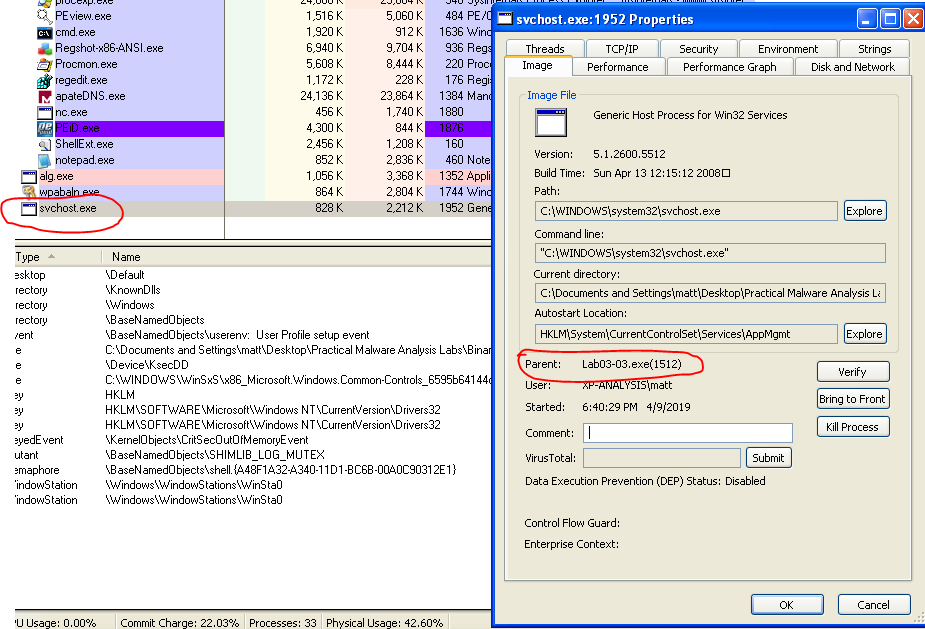
When run, the Lab03-03.exe process shows up briefly with a child process of svchost.exe. After a few seconds, the Lab03-03.exe process disappears, but svchost.exe is still there, but not actually running any services. When viewing the properties of svchost, it still lists the lab file as it’s parent and gives the parent’s PID.
Question 2: Can you identify any live memory modifications?
When filtering Procmon to the PID of the parent process, it doesn’t give any results. However, when filtering to the PID of the active svchost.exe process the program created it gives multiple results for opening and writing to a file called “practicalmalwareanalysis.log” in the same folder as Lab03-03.exe. After opening that file, it seems to be logging the keystrokes on my computer.


Question 3: What are the malware’s host-based indicators?
The most obvious host-based indicator would be the log file it creates above – “practicalmalwareanalysis.log”.
Question 4: What is the purpose of this program?
It’s a keylogger that logs the keystrokes on the computer and the window they occur in.
Lab 3-4 (Lab03-04.exe)
Question 1: What happens when you run the file?
It runs for a second or so, flashes a command window up, and then closes. When looking through Procmon for anything that references cmd.exe (based on the cmd window popping up briefly), we find the entries for when it is creating the process, but the command line arguments seem to be for deleting the binary file instead of doing anything exciting.

Question 2: What is causing the roadblock in dynamic analysis?
The program doesn’t look like it actually does anything malicious. It seems to detect that something isn’t working correctly so it doesn’t continue execution and tries to delete itself. My guess would be that the malware might be detecting that I’m running it in a virtual machine as opposed to a physical computer, but we’ll find out later as the book says we’re going to analyze this one again in chapter 9.
Question 3: Are there other ways to run this program?
I tried running it from the command line, but get the same results as what happens in question 1.
 My InfoSec Adventures